Building the platform for global growth, release by release.
Catch up on the latest features, improvements, and platform updates from the team at Ebury — built to help your business move money smarter and faster.
Catch up on the latest features, improvements, and platform updates from the team at Ebury — built to help your business move money smarter and faster.

We are excited to introduce a redesigned drawdown experience for our Supplier Payment Finance credit line, built to make managing your working capital faster and far more intuitive.
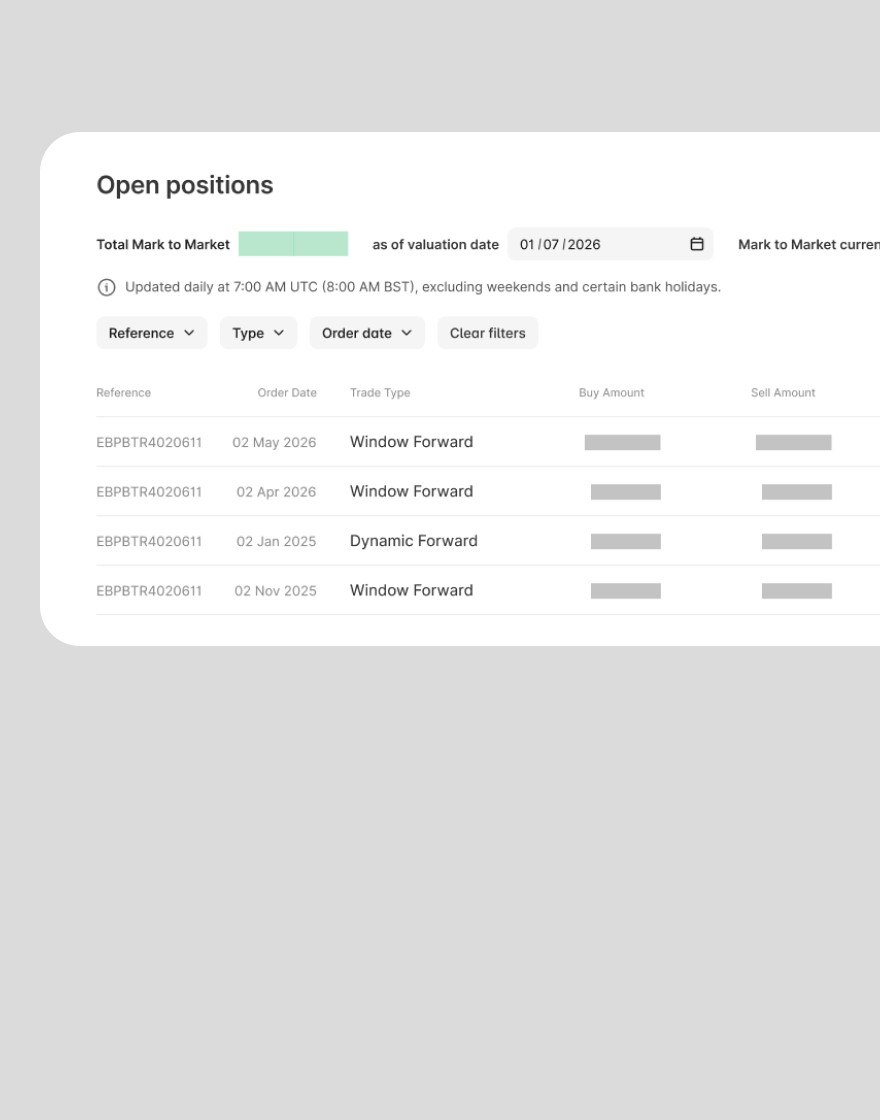
Building on our recent launch of real-time credit condition tracking, we are extending full visibility to your FX position valuations.

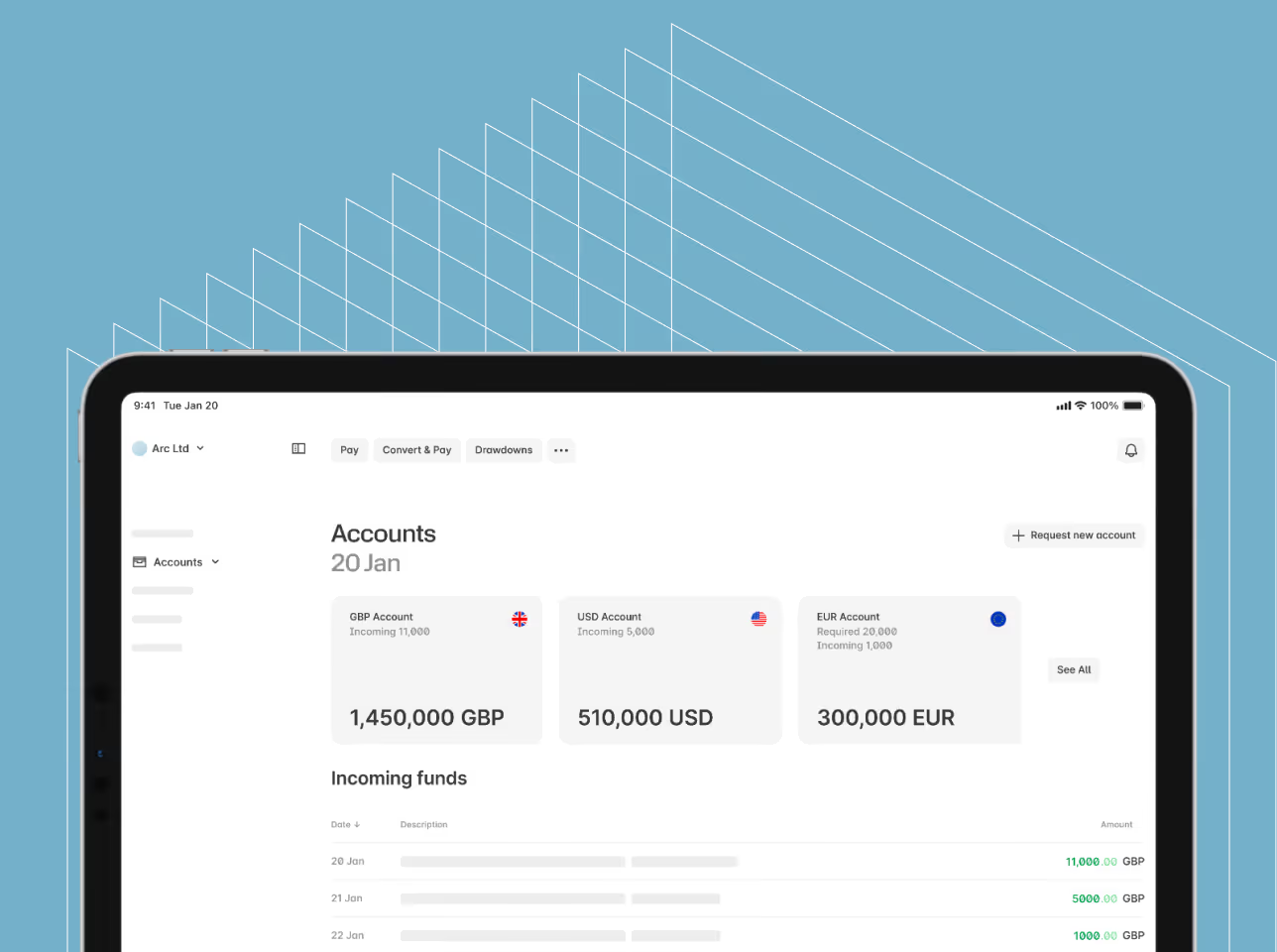
Home is now live for all Ebury clients. We’ve launched a new landing experience that gives you a clear, at-a-glance view of everything that matters the moment you log in.
You can now integrate Sage with your Ebury multi-currency accounts

Improved and more intuitive Financing dashboard

Hedge now brings the whole process into one place where you can see the trade, review the scenarios, rates and schedule, and instruct, all in the same session.
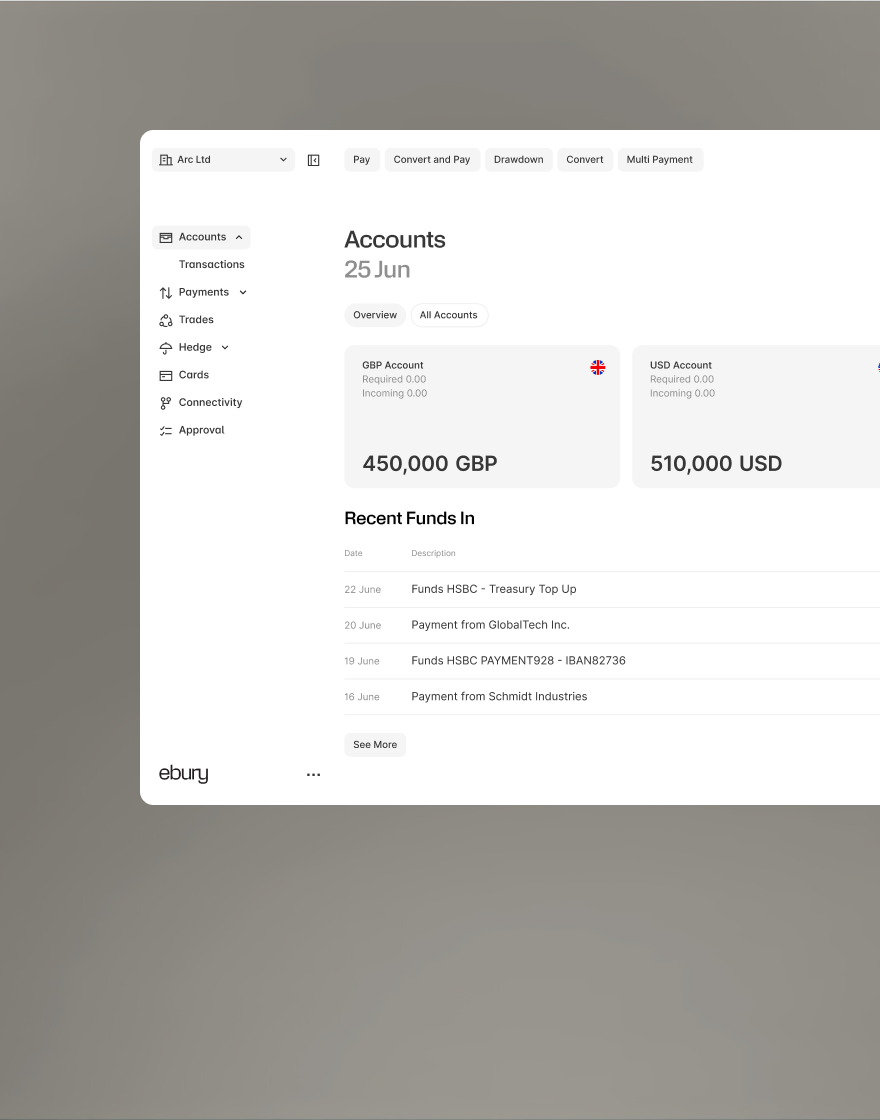
We’ve introduced favourite currencies, giving you more control over how your Accounts dashboard is organised.

Track your Credit Condition notional amounts in real time.

The Ebury app is now available globally, making it even easier to manage your international payments and FX on the go, from wherever you operate.
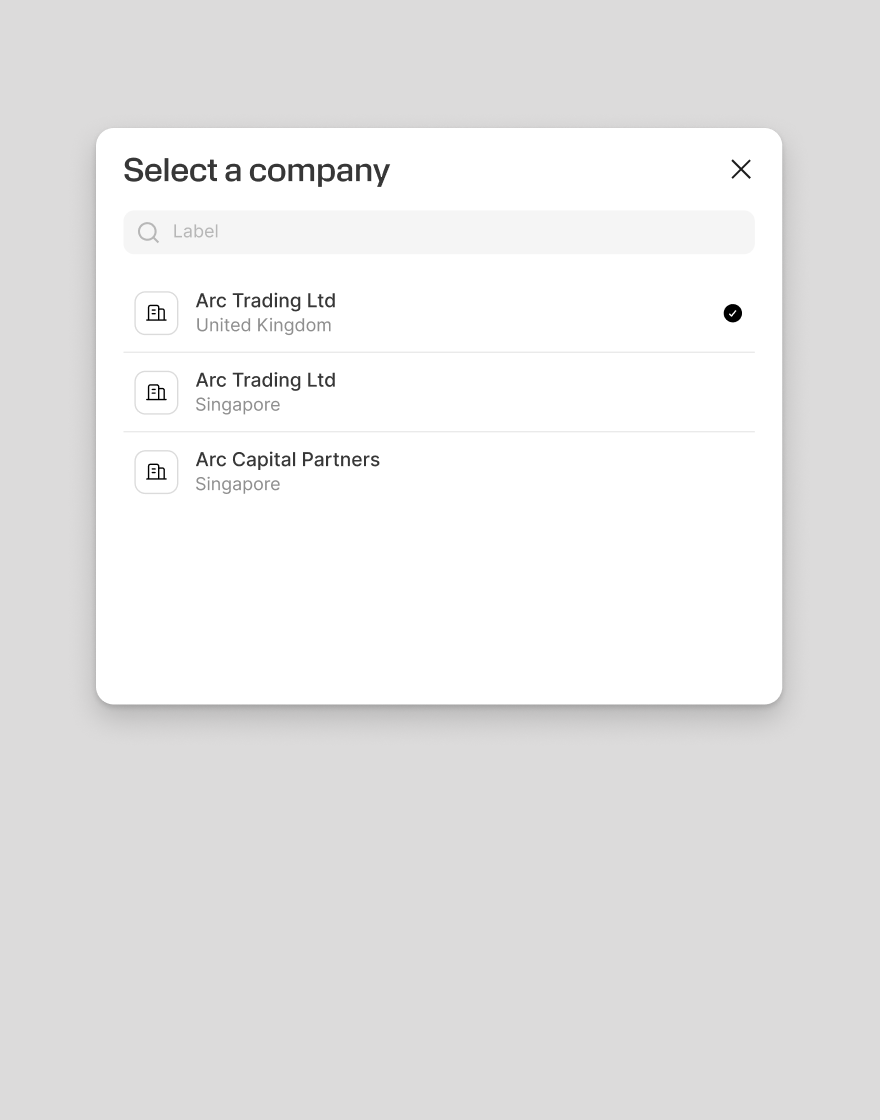
Ebury now has a new feature, Switch entity, available consistently at the top of every screen, making it simpler to work across multiple entities.
What’s new: September 2026
Highlights from this month:
- Trade quotes in Hedge
- Ebury App available globally
- Entity switcher
Trade quotes and booking, now built into Hedge
Ebury has replaced the old process of long, back-and-forth email threads with the ability to send trade quotes directly into Hedge. This feature allows you to review Options, Dynamic Forwards and TARFs* side by side, and then instruct Ebury to book the trade digitally, all without leaving the platform.
Now you can see the trade, review the rates, schedule and scenarios, and give your instruction in one continuous session, without a manual sign-off cycle, with every trade action automatically logged.
Global cash flows in your pocket
The Ebury app is now available to clients globally, letting you manage international payments and FX on the go from your phone. We’ve also expanded Android availability, bringing the app to more devices than ever before.
Whether you're checking a rate, sending a payment or monitoring your accounts, the Ebury app keeps your business finances accessible anytime, anywhere. Download it today on the App Store or Google Play.
A faster way to switch entities
Switching between entities in Ebury is now faster and clearer, with a new always-visible entity switcher that lets you move between entities without leaving the page you're on.
From proposal to booking, without leaving Hedge
Hedging decisions have always involved a lot of back and forth: a quote by email, a scenario table buried in an attachment, a question about what happens if the market moves, then another reply or three. Hedge now brings the whole process into one place where you can see the trade, review the scenarios, rates and schedule, and instruct, all in the same session.
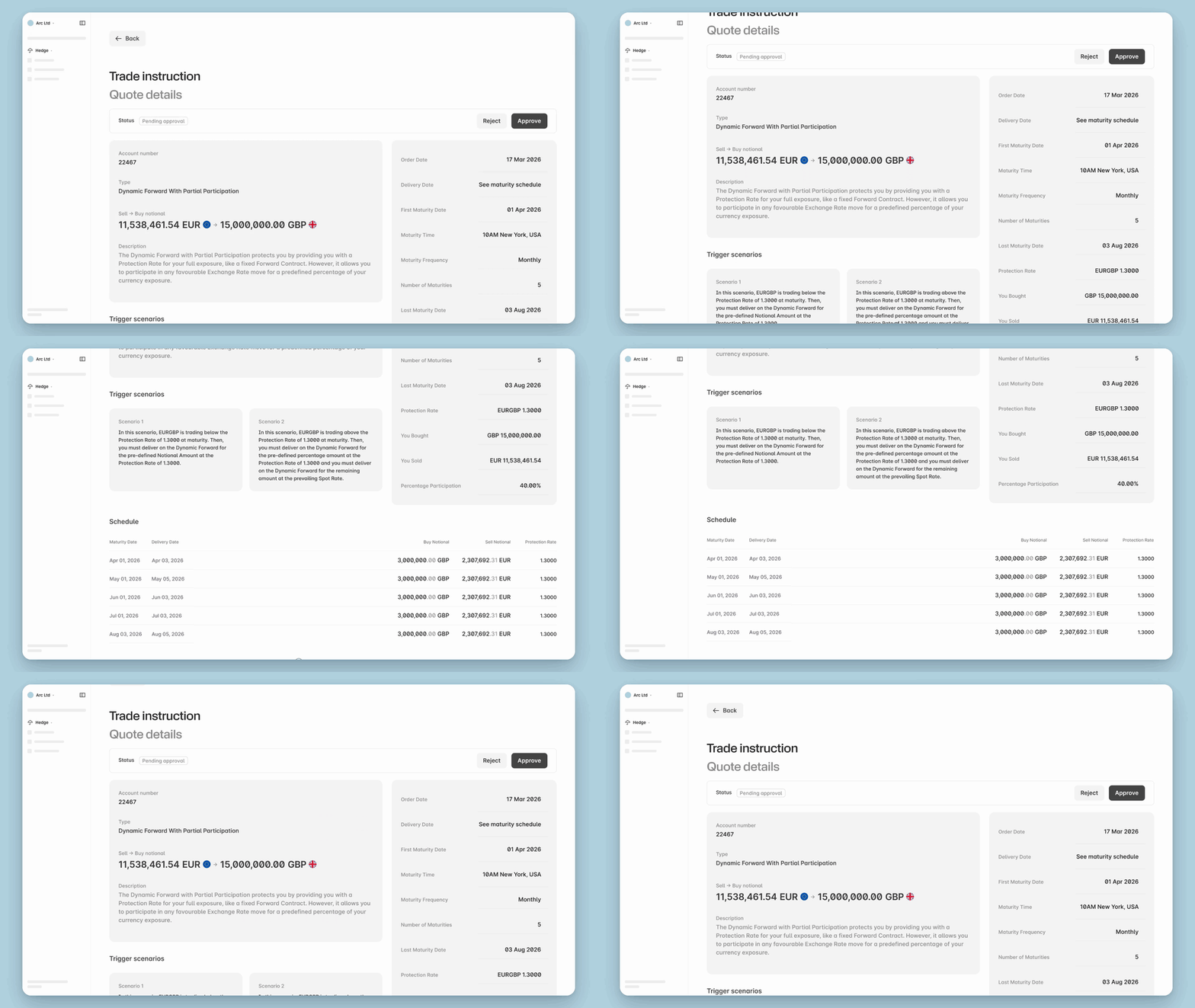
Review Options, Dynamic Forwards and TARFs* from a single dashboard, each with its full product description and scenario analysis alongside it.
When you're ready, instruct Ebury to book the trade digitally. No email chain, no manual sign-off cycle, and every trade is easy to go back and review.
*Note: Options, Dynamic Forwards and TARFs are available in select jurisdictions, based on local regulatory requirements. Please get in touch with your dedicated client manager to learn FX products offered in your country.
The Ebury app is now available worldwide
The Ebury app is now available globally, making it even easier to manage your international payments and FX on the go, from wherever you operate.

We've also expanded availability on Android, making the app accessible to more clients on Android devices than ever before.
Whether you're checking a rate, sending a payment or keeping an eye on your accounts, the Ebury app puts your global cash flows in your pocket so you can track transactions and trades from everywhere.
Download the Ebury app from the App Store or Google Play today.
Switching between entities just got easier
Ebury now has a new feature, Switch entity, available consistently at the top of every screen, making it simpler to work across multiple entities.
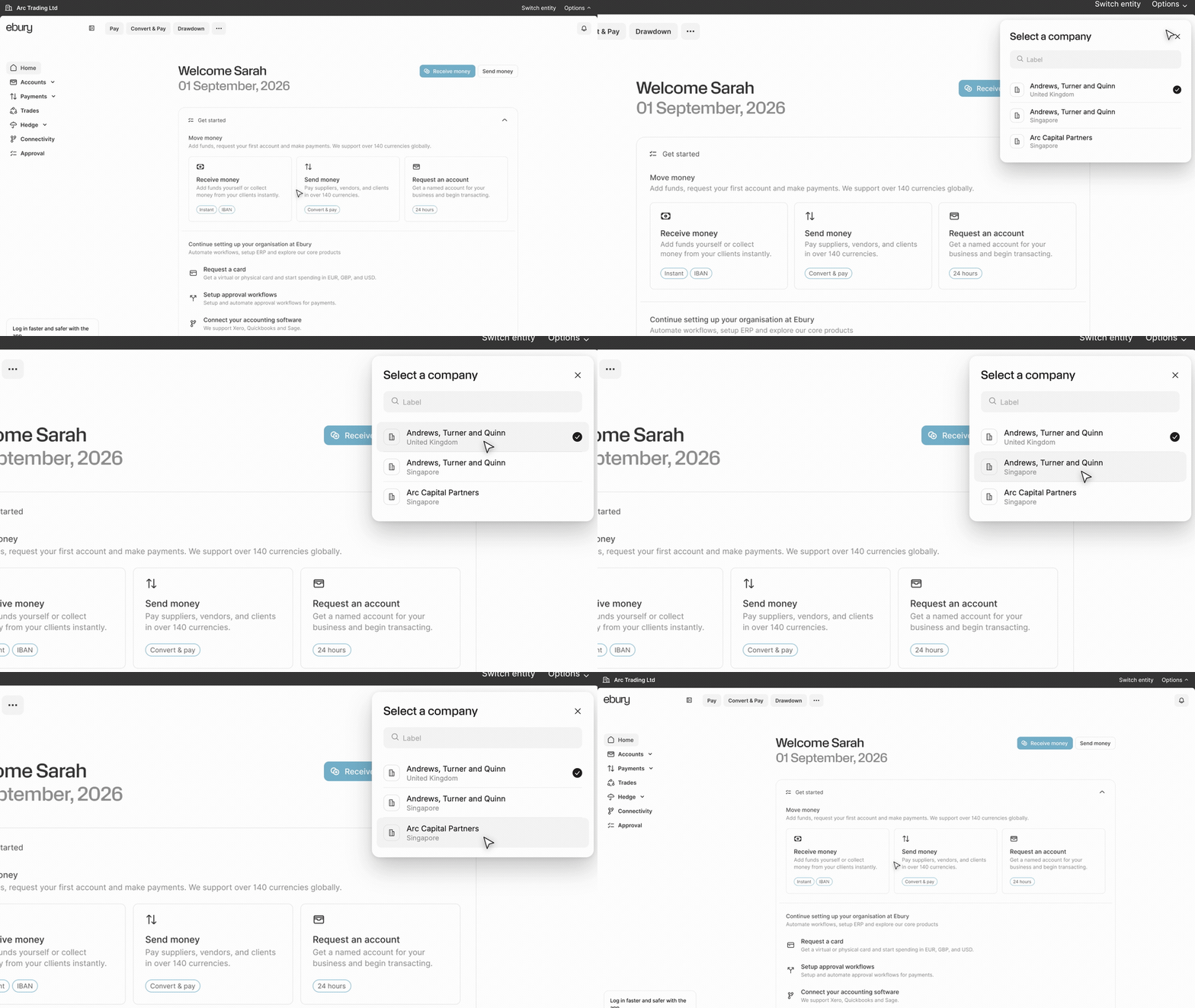
You can move between entities without leaving the page you're on, making it faster to navigate different parts of your organisation in Ebury.
Switch entity also makes it clearer which entity you're currently working in, with better support for longer names and for businesses operating across multiple countries.
A small change, but one that you’ve asked for, and one that makes multi-entity navigation faster and clearer.
What’s new: August 2026
Highlights from this month:
- Ebury Accounts: Access real-time account data and core cash management tools from a unified, centralised dashboard upon login.
- Hedge: Generate instant Mark-to-Market (MTM) valuations and export historical or current financial statements (PDF, CSV, Excel) to streamline accounting and audit workflows.
- Financing: Request supplier credit line drawdowns through an intuitive, automated workflow designed to eliminate manual data entry errors and speed up funding.
A simpler Home for your Ebury accounts
Home is now live for all Ebury clients, bringing your most-used financial tools together into a single command centre the moment you log in.
- Enjoy instant account visibility: Track multi-currency account balances, pending payments, FX hedging positions, credit lines, card spend, and statement downloads directly from your main screen – no menu navigation required.
- Get guided onboarding: New clients can follow step-by-step guides to make their first currency transfer, request cards (UK only), configure approval workflows, and sync accounting software.
Home is designed to save you time and clicks, and we will keep adding new widgets based on your feedback.
On-Demand Mark-to-Market (MTM) Reporting
Instantly generate and download current or historical FX position valuations directly within your Ebury accounts. Export statements in PDF, CSV, or Excel to feed straight into your accounting models and streamline month-end closes – no manual requests required.
Streamlined Supplier Payment Finance Drawdowns
Requesting a credit drawdown is now faster and more intuitive. We’ve replaced manual form-filling with a two-step experience that minimises data entry errors, eliminates delays, and accelerates your access to finance.*
*Available in selected jurisdictions, subject to eligibility and local regulatory requirements.
Introducing Home: your new starting point for Ebury accounts

Home is now live for all Ebury clients. We’ve launched a new landing experience that gives you a clear, at-a-glance view of everything that matters the moment you log in.
Instead of navigating through menus to find what you need, Home brings your most-used tools and information together in one place, through a set of dedicated widgets:
- Request statement: Pull account statements in seconds, without digging through account settings
- Accounts: See balances and activity across your currencies at a glance
- Hedge: Track your FX hedging positions and stay on top of market exposure
- Payments: Monitor recent and pending payments in one view
- Card: Check card activity and spend without switching screens
- Financing: Keep tabs on financing facilities and outstanding balances
New to Ebury?
Home also includes a dedicated Get Started section to walk you through your first steps, including:
- Requesting, sending, and converting money for the first time
- Requesting corporate cards (UK only)
- Setting up approval workflows
- Connecting your accounting software
Together, these widgets turn Home into a real command centre for managing your business finances with Ebury: faster access, fewer clicks, and better visibility from the moment you sign in, whether you're a long-standing client or just getting set up.
This is just the beginning: we'll keep adding widgets based on what you tell us matters most.
Log in to your Ebury accounts today and see your new Home.
Self-service MTM valuations are live
What’s New:
- Instant MTM Valuations: Access live revaluation rates and real-time market values for all open FX positions directly within your dashboard.
- Multi-Format Data Exports: Download reports instantly in PDF, CSV, or Excel format to match your team’s precise operational workflows.
- Unified Reporting: View current-period valuations alongside historical statements in a single location to simplify month-end and year-end closes.

Building on our recent launch of real-time credit condition tracking, we are extending full visibility to your FX position valuations. Ebury clients can now generate on-demand Mark-to-Market (MTM) reports and export current and historical statements whenever they need them—no waiting required.
Data Structured for Your Workflows
We know that financial data needs to move smoothly into your existing systems. With this update, you no longer have to wait on a request-and-reply cycle to get position valuations for your finance team or auditors:
- PDFs ready for sign-off, board packs, and compliance filing
- CSV and Excel files formatted to feed directly into your hedge accounting models, ERP systems, and internal reporting tools
Full Control, Backed by Expert Support
This self-service functionality puts full reporting control in your hands, giving your finance team the speed and flexibility needed to manage market exposure efficiently.
While you can now pull valuation reports in seconds, your dedicated Relationship Manager remains on hand to assist with complex portfolio questions, hedging strategy, and market insights whenever you need them.
Log in today to view your live MTM valuations and export your latest statements.
A simpler, faster way to request supplier payment finance
We are excited to introduce a redesigned drawdown experience for our Supplier Payment Finance credit line, built to make managing your working capital faster and far more intuitive. To eliminate tedious manual form-filling that previously led to typos and delays, we’ve replaced old request forms with a streamlined, two-step workflow powered by intelligent data extraction.
By automatically scanning your invoices and pre-filling your drawdown requests, our technology does the heavy lifting for you—helping you minimize errors, cut down processing times, and access your trade credit with total ease.
How the new two-step journey works
Step 1: Upload your invoices
You can now upload the invoices you wish to finance in seconds:
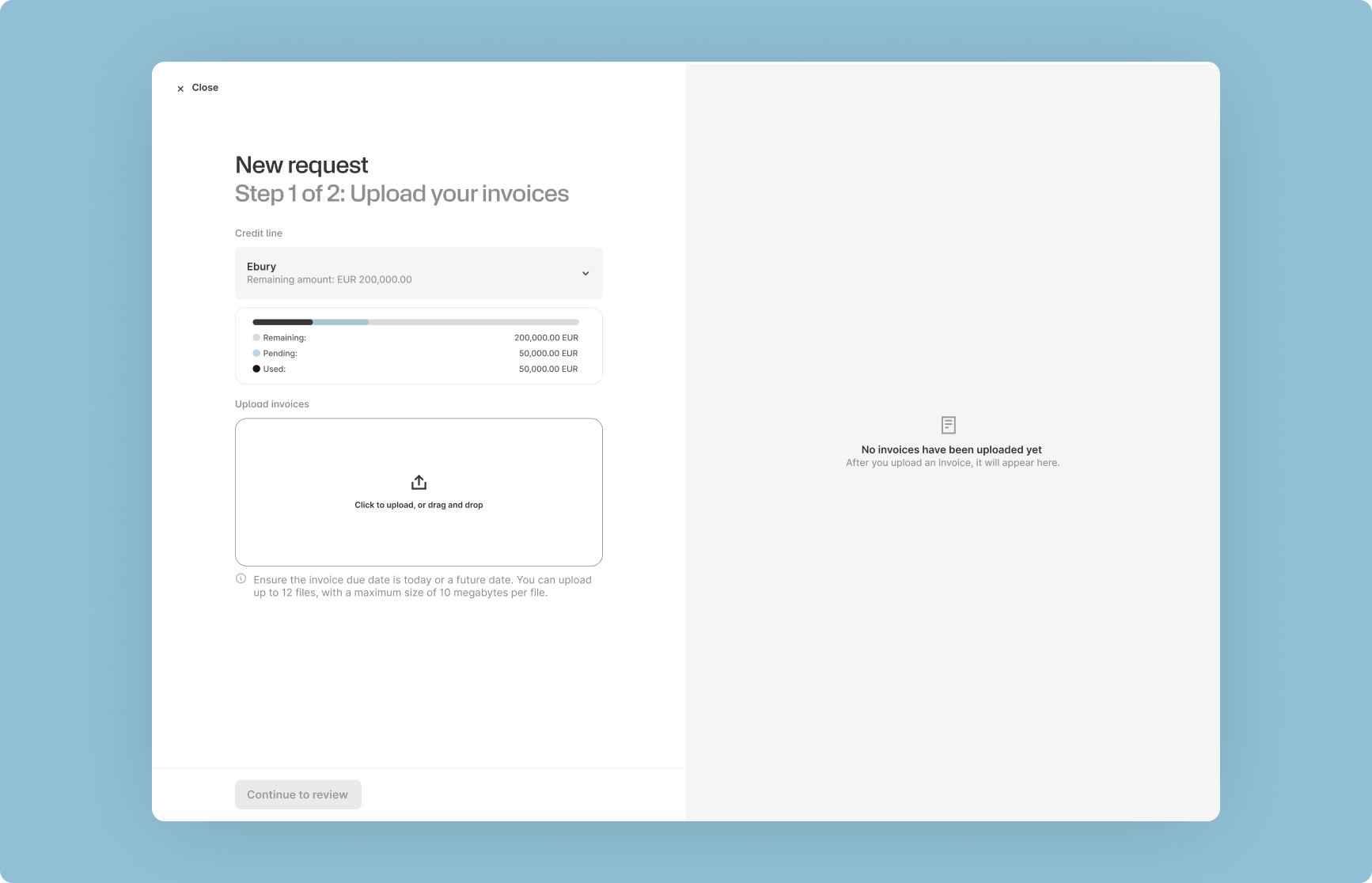
- Drag-and-drop uploading: Easily upload invoice files directly from your desktop or device.
- Instant credit line visibility: A redesigned credit summary dashboard shows your available credit, current utilization, and pending drawdown requests before you submit anything new.
- Split-screen preview: View a side-by-side preview of your uploaded documents alongside your account details to ensure you always have the right context.
Step 2: Review pre-filled details and submit
Once your documents are uploaded, our technology automatically reads the key invoice data and pre-populates the drawdown request form for you.
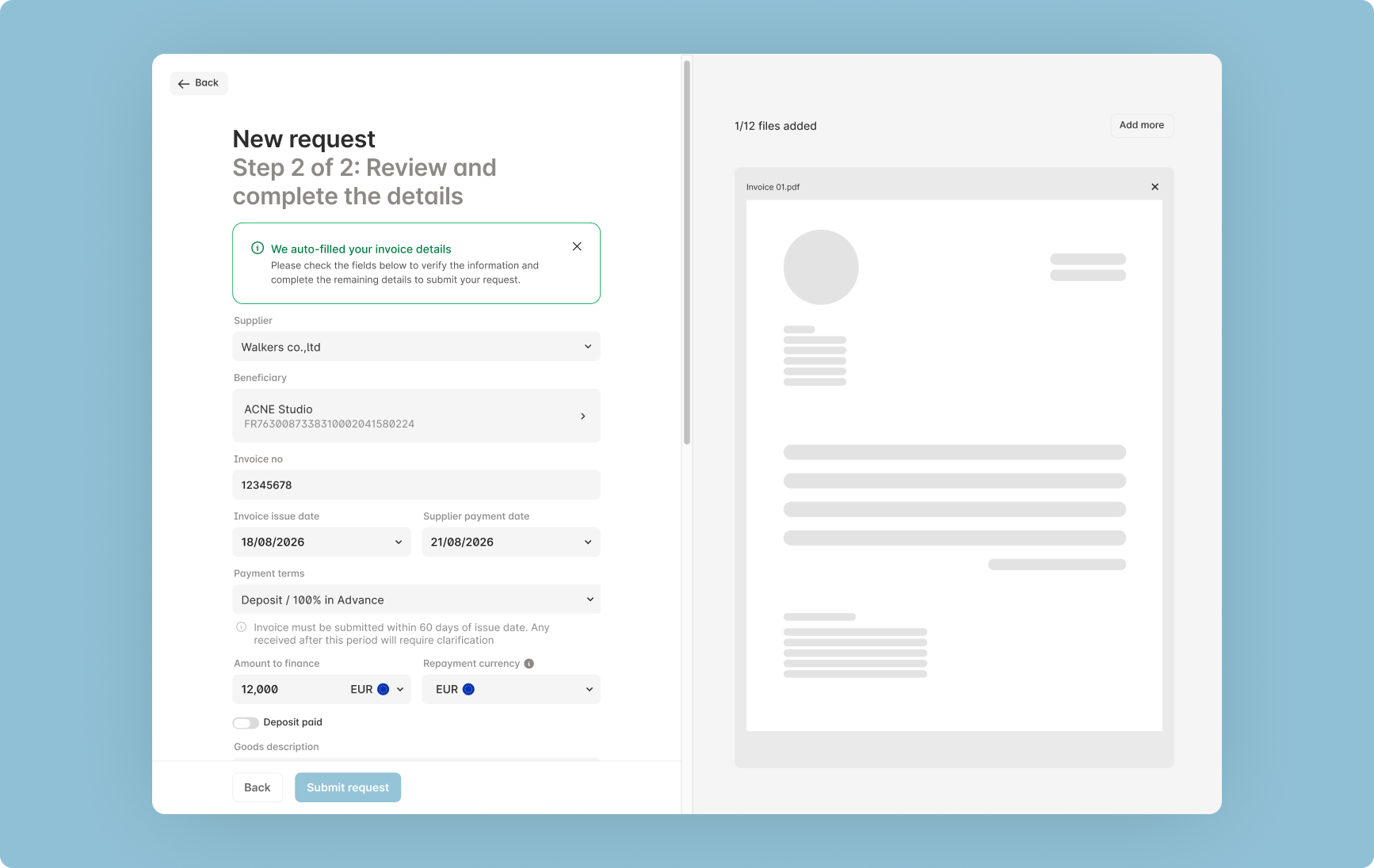
All that is left for you to do is:
- Review the automatically extracted fields for accuracy.
- Fill in any custom notes or missing details if needed.
- Verify your documents against the form using the side-by-side preview.
- Submit your request with complete confidence.
What this means for your business
By automating the routine parts of the drawdown request, this update delivers several immediate benefits to your day-to-day finance operations:
- Faster request submissions: Move from invoice receipt to financing request in just a few clicks.
- Minimal manual data entry: Save time by letting intelligent OCR technology read your invoices.
- Fewer errors and delays: Pre-populated data reduces human error and speeds up approval times.
- Total clarity and control: Clear document previews and transparent credit limits give you peace of mind before you hit send.
The new Supplier Payment Finance request journey is now live. Log in today to try out the new upload experience on your next drawdown.
Available in selected jurisdictions, subject to eligibility and local regulatory requirements.
What’s new: July 2026
Highlights from this month:
- Financing: Improved and more intuitive client experience
- Hedge: Real-time FX credit condition tracking
Streamlining cash flow management: Our latest updates to Financing and Hedge
Effective cash flow management is central to your business success. To help you manage your facilities with greater confidence and efficiency, we’ve introduced several key updates to our Financing and Hedge platforms.
Enhanced Financing platform experience
We have redesigned our Financing pages to offer a cleaner, more intuitive interface.
- Streamlined navigation: Access the information you need quickly and logically, reducing time spent searching for data.
- Simplified credit management: Draw down on and manage your credit line with fewer steps.
- Immediate access to data: View your critical financial metrics at a glance to make faster operational decisions.
Real-time credit and margin tracking
Our new tracking feature on Ebury Web/Hedge provides complete visibility into your credit and margin requirements, removing the need to wait for manual notifications or market updates.
- Live facility utilisation: Monitor precisely how your facility is being utilised in real time as the market moves.
- Proactive risk management: View your positions instantly, giving you the clarity needed to make well-timed financial decisions.
These updates are now live. Log into your Ebury account today to explore the new features, or contact your relationship manager if you would like a brief walkthrough.
Introducing our redesigned Financing experience
What’s new:
- Improved and more intuitive Financing dashboard
- Streamlined credit line workflow and tracking
A simpler, more intuitive way to manage your Supplier Payment Finance line
Managing cash flow is essential for every business. That's why we've redesigned our Financing pages to deliver a more intuitive experience. With improved navigation and a cleaner interface, you can manage your credit line more easily and quickly access the information that matters most.
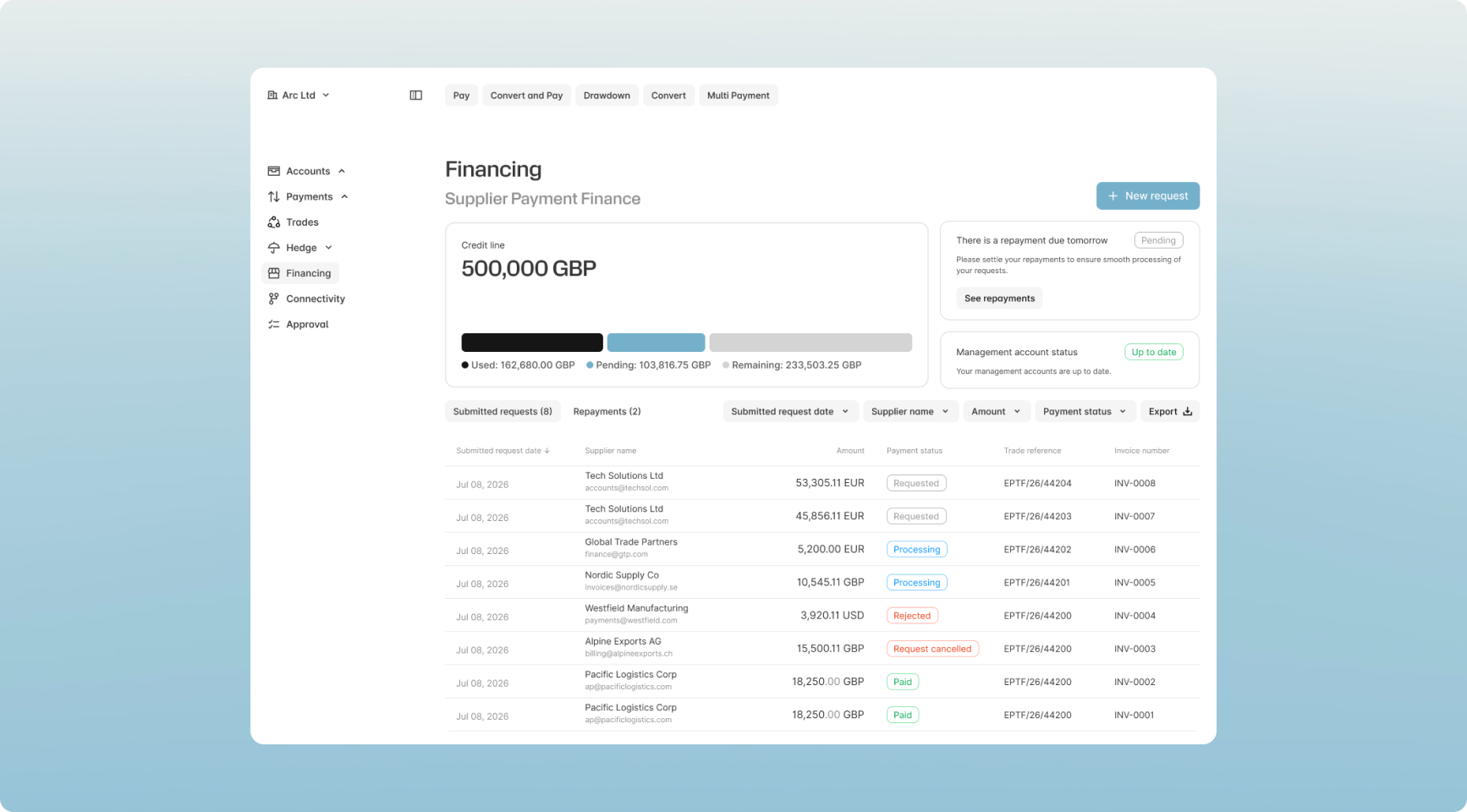
We’ve upgraded your dashboard to make managing your finance line smoother and more intuitive than ever. You can now track your available credit line with a clear view of pending trades, instantly locate newly submitted requests, and monitor repayment statuses directly from your main screen. To keep your workflow moving quickly, we’ve also introduced bolder, easy-to-scan status indicators and clear prompts that let you know exactly when management accounts are due for your line renewal.
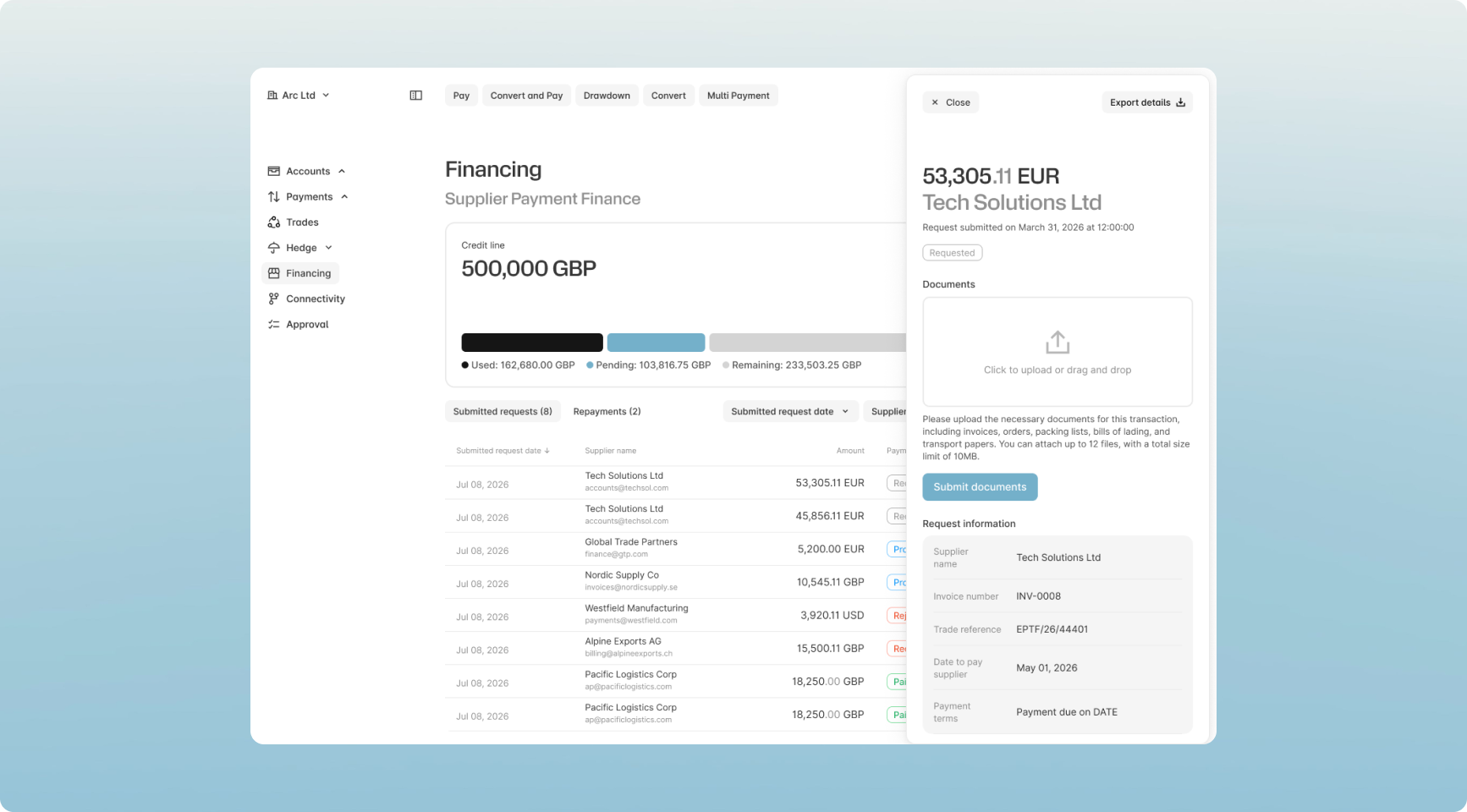
To learn more about Supplier Payment Finance solutions visit Ebury Supplier Payment Finance | Scale Faster
New Features
- Repayment workflow: Enabling users to easily check repayment statuses directly from the dashboard with quick navigation links to the main repayment table.
- Management Accounts status: Enabling users to quickly identify when management accounts need providing for line renewal.
- Request tracking: Ensures newly submitted requests are instantly discoverable within the main table.
Improvements
- Credit line visibility: Improving the design and adding a new feature to show pending trades making tracking the available credit line more intuitive.
- Status design: Improving the design with improved status indicators to make them more visually prominent and easy to scan.
Real-time FX Credit Condition Tracking
What’s new:
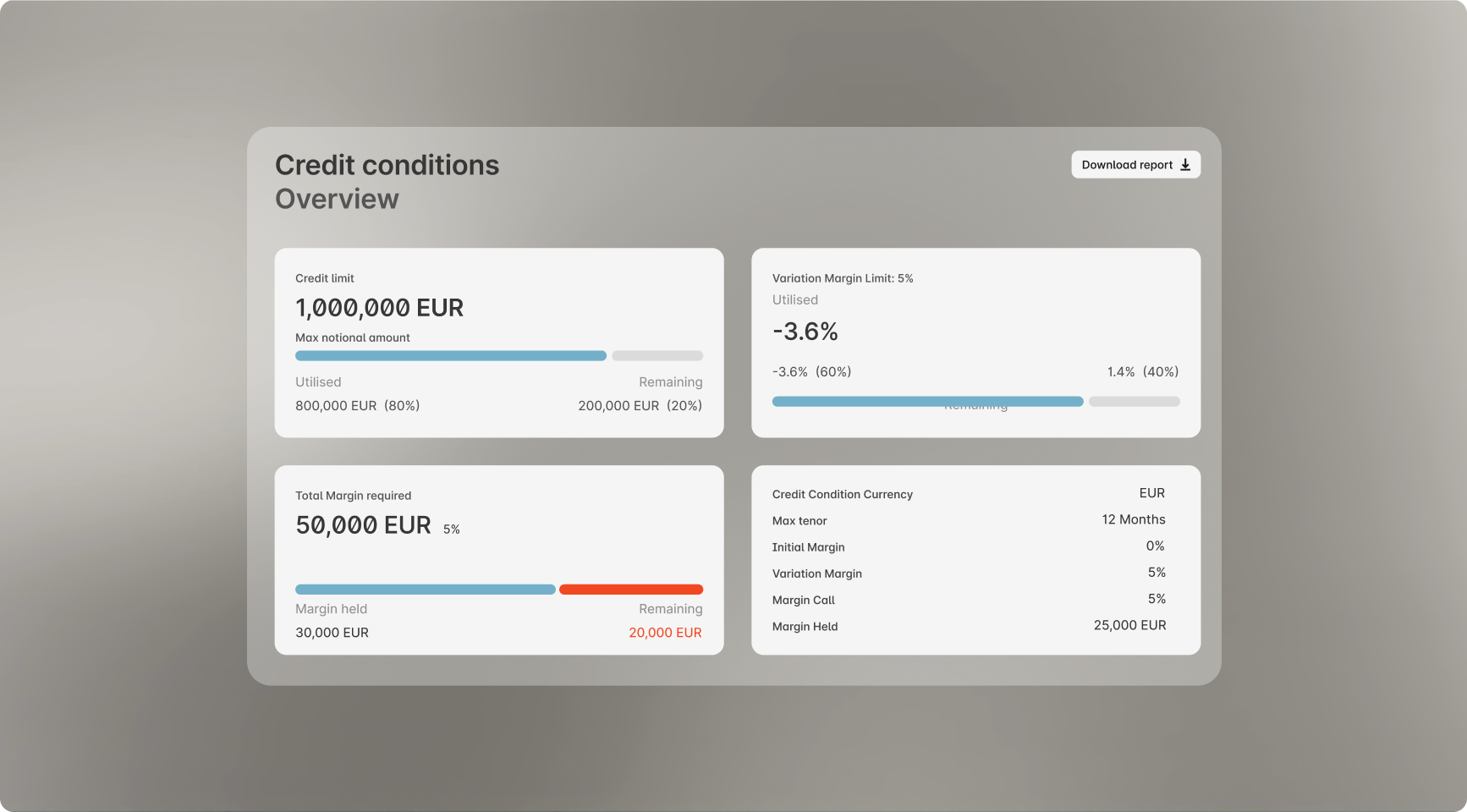
- Track your Credit Condition notional amounts in real time.
- Monitor Variation Margin utilisation to see exactly how far away you are from a margin call.
- View any margin required to pay alongside the total margin currently held by Ebury.
Gain full transparency over your credit health in a single view
We’re introducing a real-time tracking feature on Ebury Web/Hedge that provides complete visibility into your credit and margin requirements. Instead of navigating blind or waiting for notifications, you can now see exactly how you are utilising your facility as the market moves.
Complete visibility for smarter capital management
Our upgraded tracking tools bring total transparency to your liquidity planning by instantly breaking down the margin required versus the funds currently held by Ebury. With a clear, visual view of your Variation Margin utilization and total credit positions, your finance team can easily anticipate potential margin calls and make timely treasury decisions. This unified dashboard eliminates the guesswork, giving you the real-time insights needed to manage your positions proactively and with absolute confidence.
Contact your dedicated relationship manager, or Speak to an Expert for more information.
What’s new: June 2026
Highlights from this month:
- Connect: Ebury/Sage integration
- Business Accounts: Personalise Accounts view
- Business Accounts, Mobile: Get statements in the app

Our commitment to innovating and improving day-to-day workflows continues, focusing on meeting our clients where they are through connection, personalisation and information on the go.
This month’s key product releases include:
- Introducing an integration with the popular accounting software, Sage, allowing you to create a seamless flow between your ledger and your Ebury multi-currency accounts.
- Personalising your Accounts dashboard to put the currencies and accounts you use most often at your fingertips.
- Bringing account statements into the mobile app, so you can view and review your accounts and balances from anywhere.
Get in touch if you have any questions, or would like more information on opening an Ebury account.
New Ebury / Sage integration
What’s new:
- You can now integrate Sage with your Ebury multi-currency accounts
- Automate your data flow to get up-to-the-minute information and reduce errors and backlogs and automated reconciliation of transactions
- Set up the integration through Ebury Web to get started
Automatically sync your Sage data with Ebury
Connecting Ebury to the software you use every day is one of the most important ways we help free up your team, save time and reduce costs. Our clients are already able to integrate with Sage 50, Sage100 online, and Sage XRT, and we’ve now added Sage to the lineup.
What is it?
A secure, real-time integration that automatically syncs your Ebury multi-currency transactions and balances directly into your Sage ledger, completely eliminating manual data entry and making reconciliation seamless.
Key Benefits
- No more manual uploads: Eliminates the need to download and upload CSV or MT940 files.
- Fewer errors & backlogs: Automated data flows minimize human entry mistakes and speed up month-end reconciliation.
- Real-time visibility: Gives your finance team an instant, accurate view of your global cash flow and FX adjustments directly inside Sage.
Setting it up
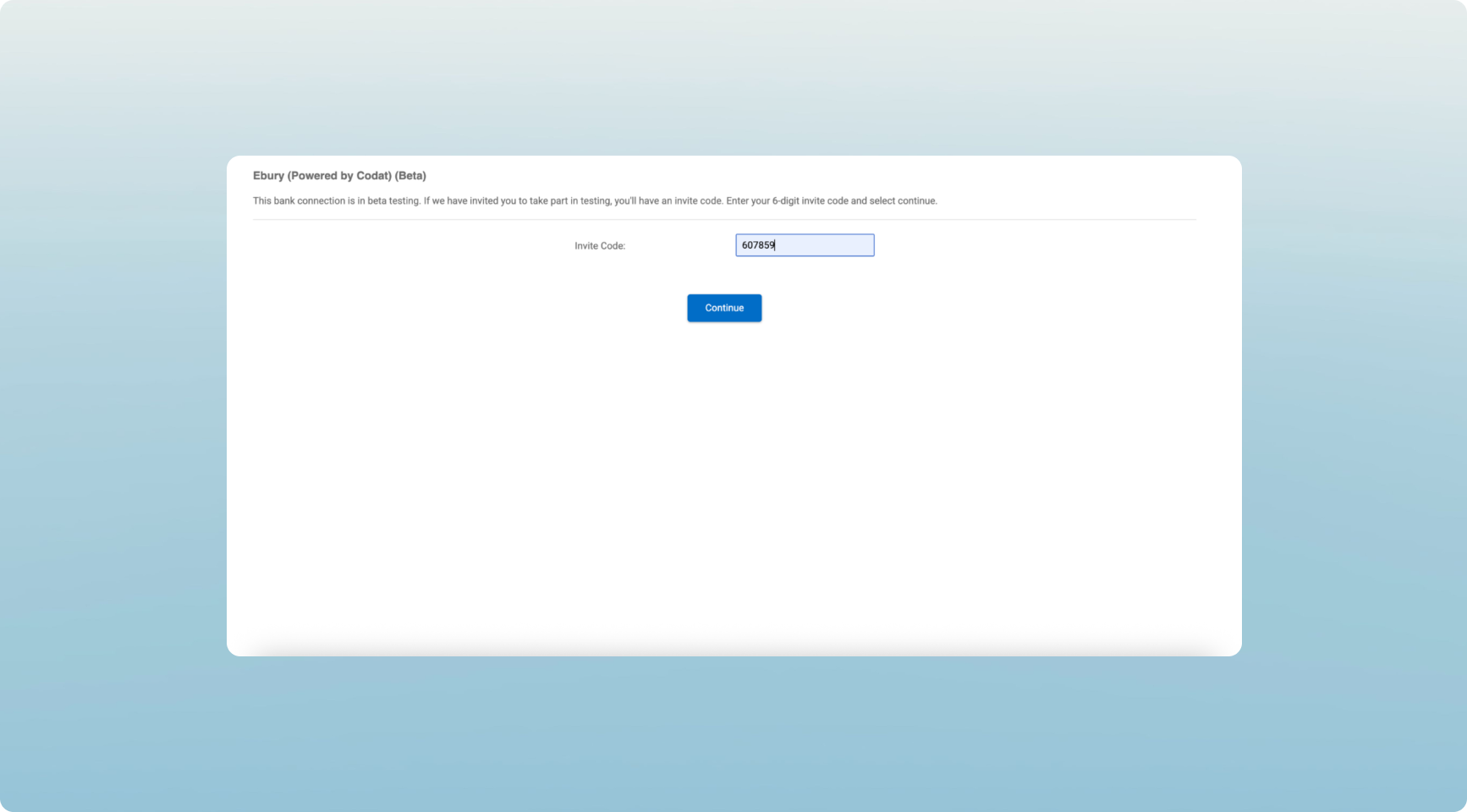
- Generate your codes: On Ebury Web, go to the Connectivity tab, select Sage, and copy your unique connection ID and invite code.
- Find Ebury in Sage: Open Sage, initiate a new bank feed setup, and select "Ebury (powered by Codat)".
- Link and sync: Enter your Ebury codes, select the account you want to connect, and complete the setup. Your data will now flow automatically.
Step-by-step instructions:
- Select the Connectivity tab in Ebury Web

- Select Sage from the drop-down list
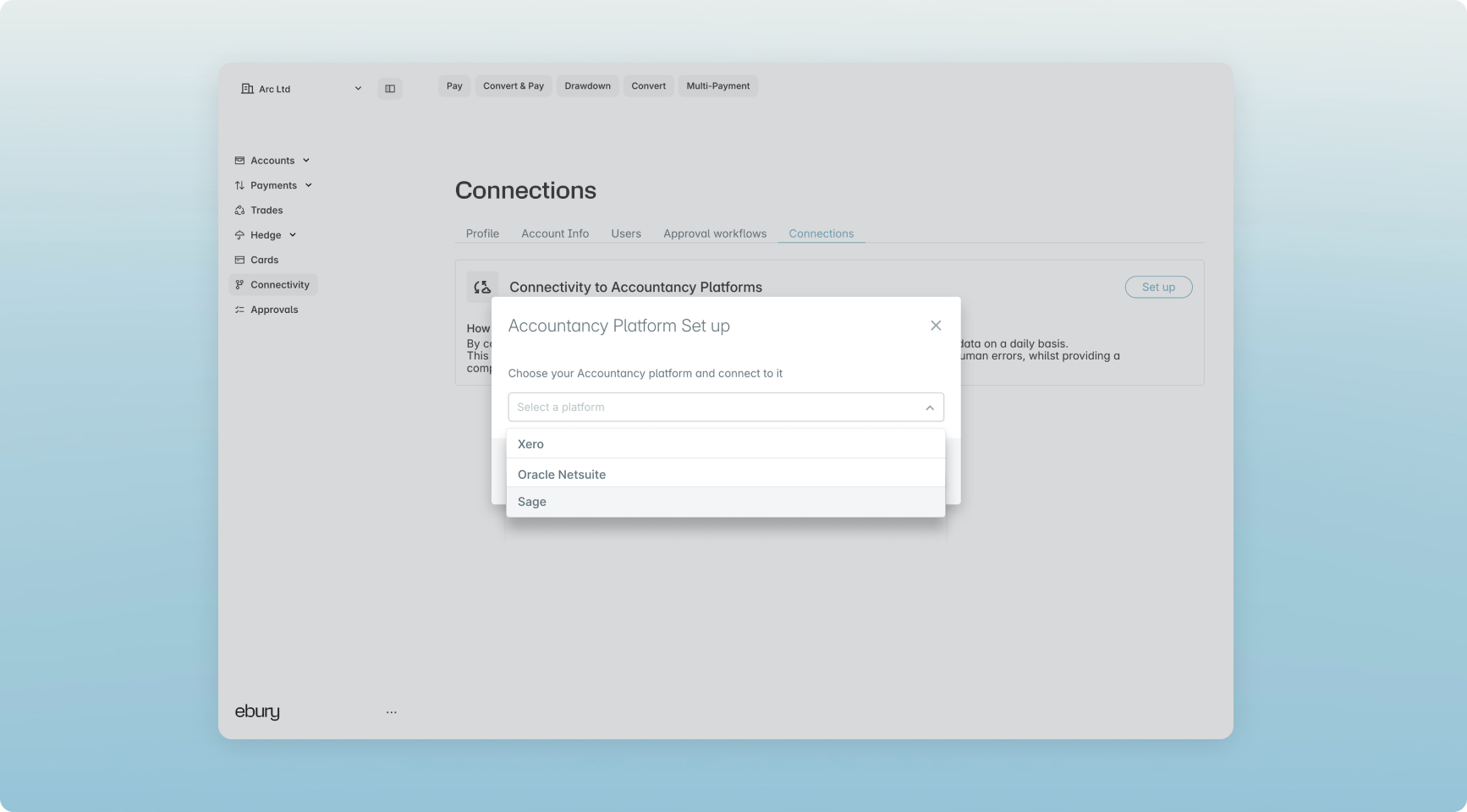
3. Open Sage and select Connect
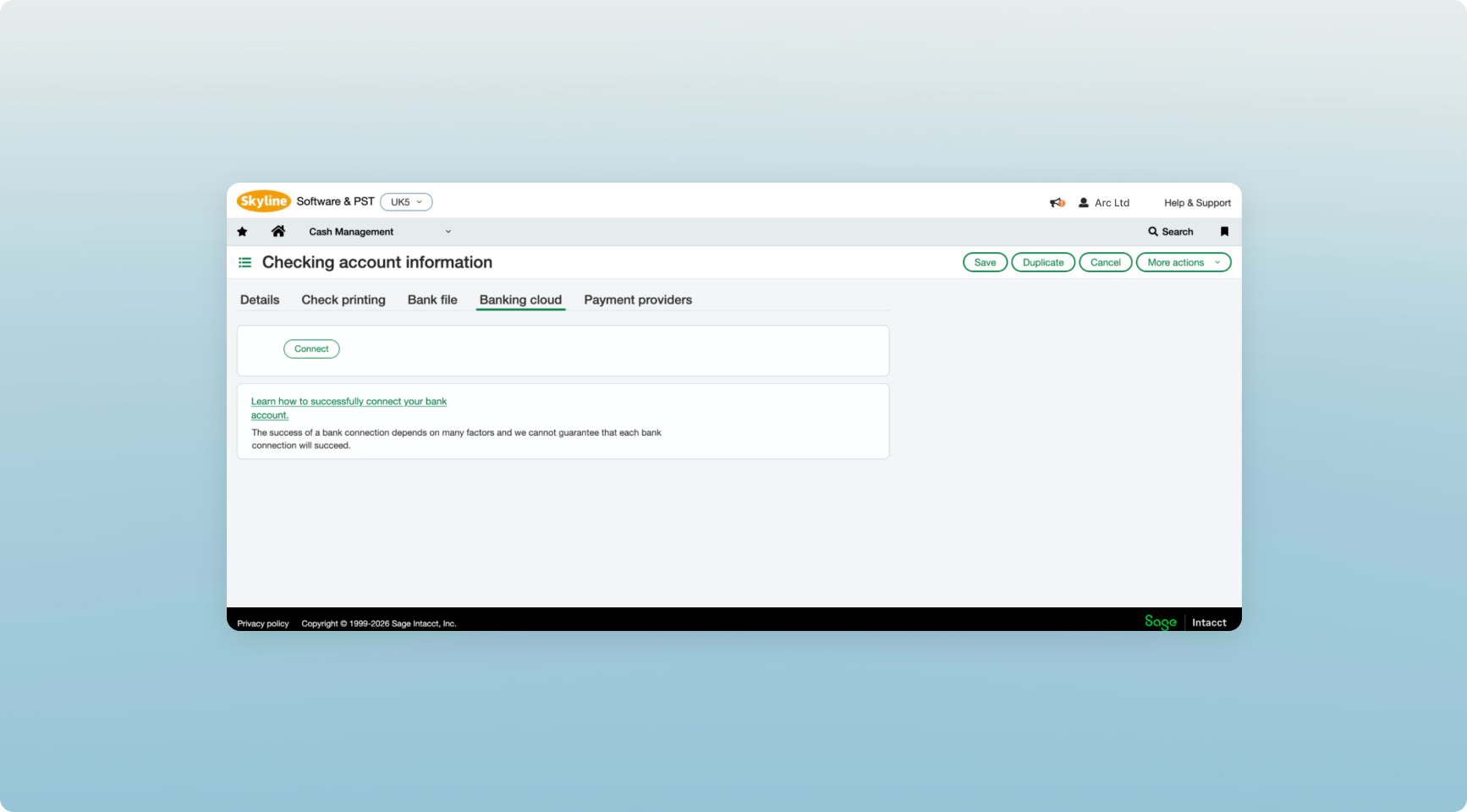
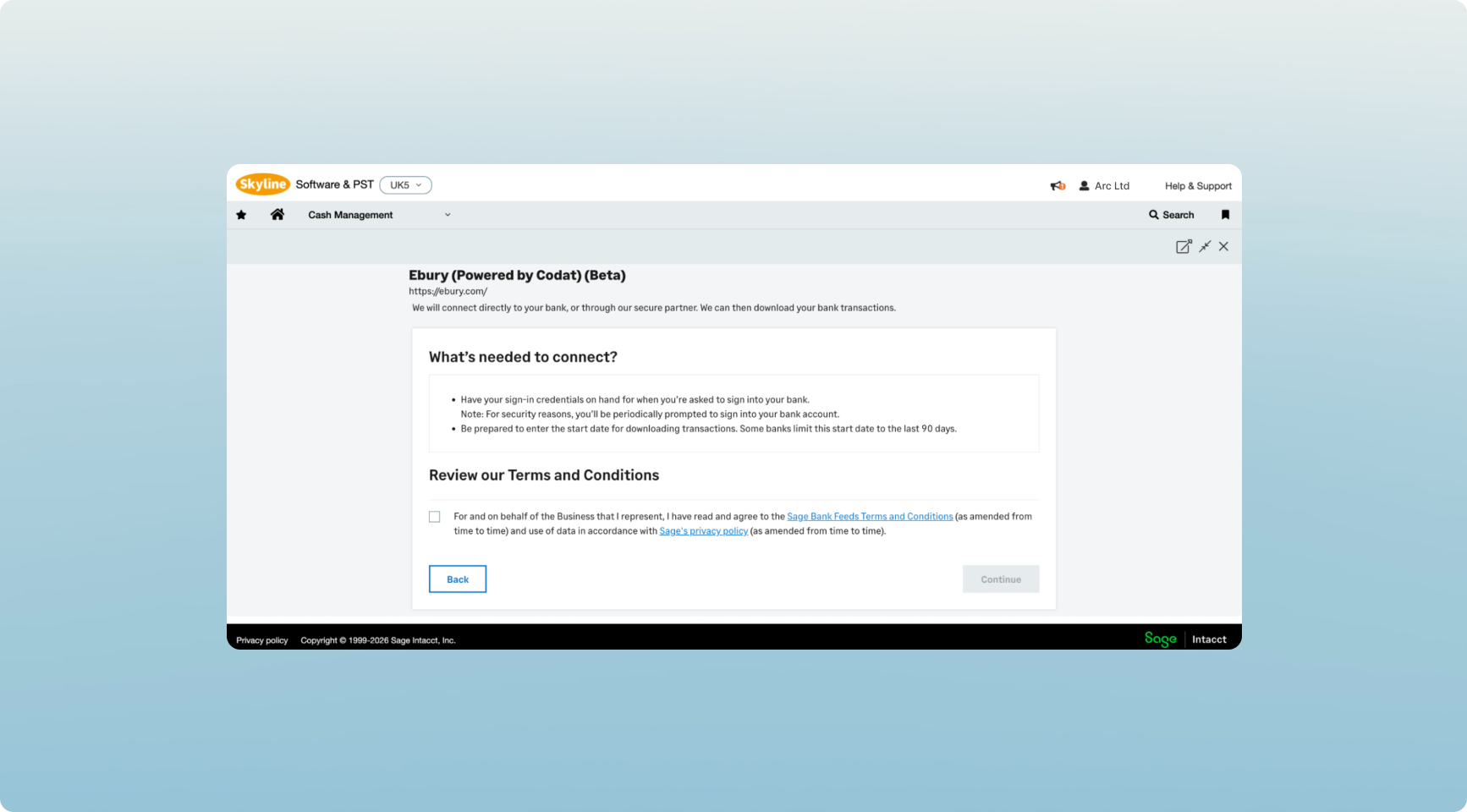
- Select Ebury (Powered by Codat)
.png)
- Accept the Terms and Conditions
- Enter or paste in your Invite Code
- Enter or paste in your Connection ID
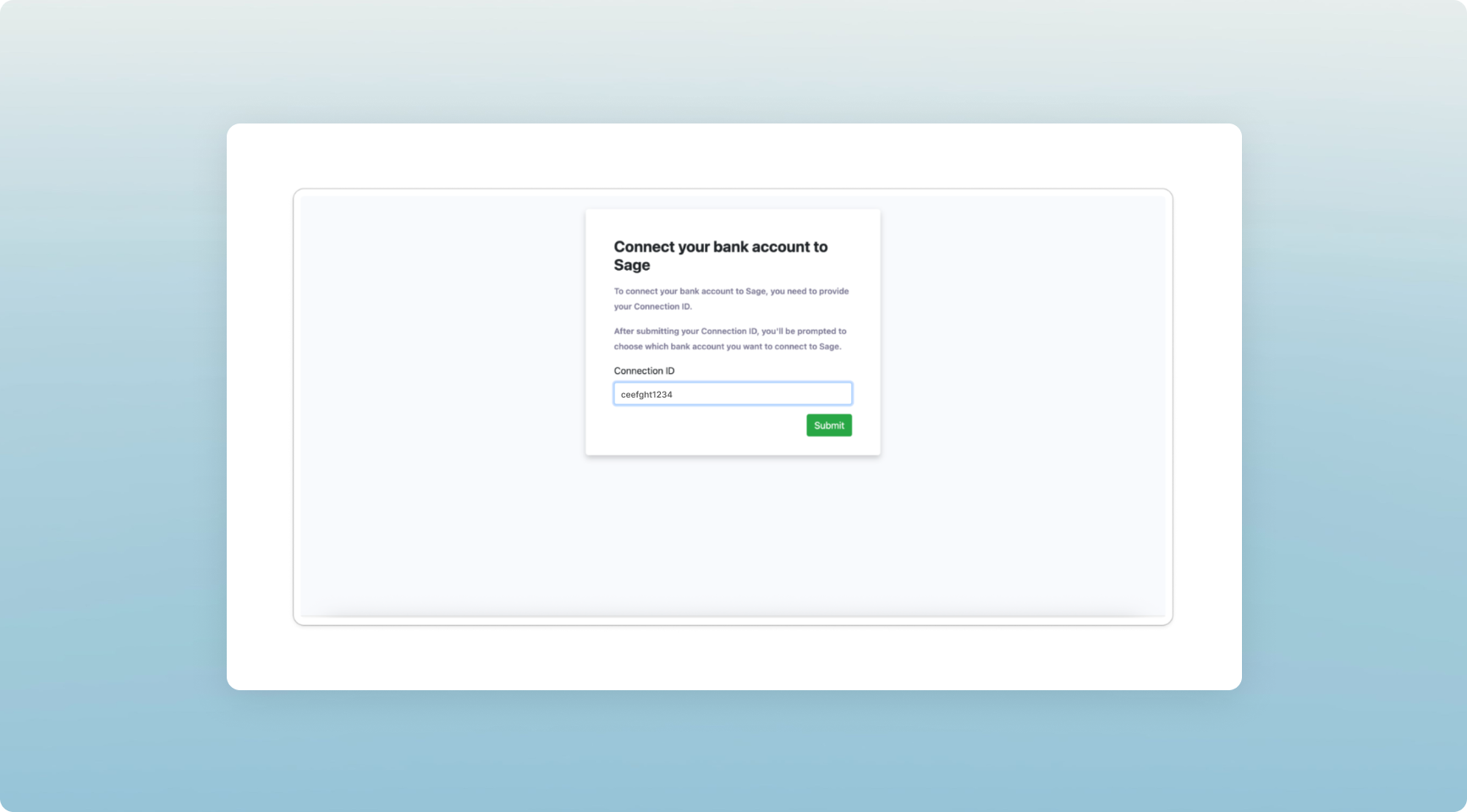
- Select your Ebury account to connect

- Confirm the connection
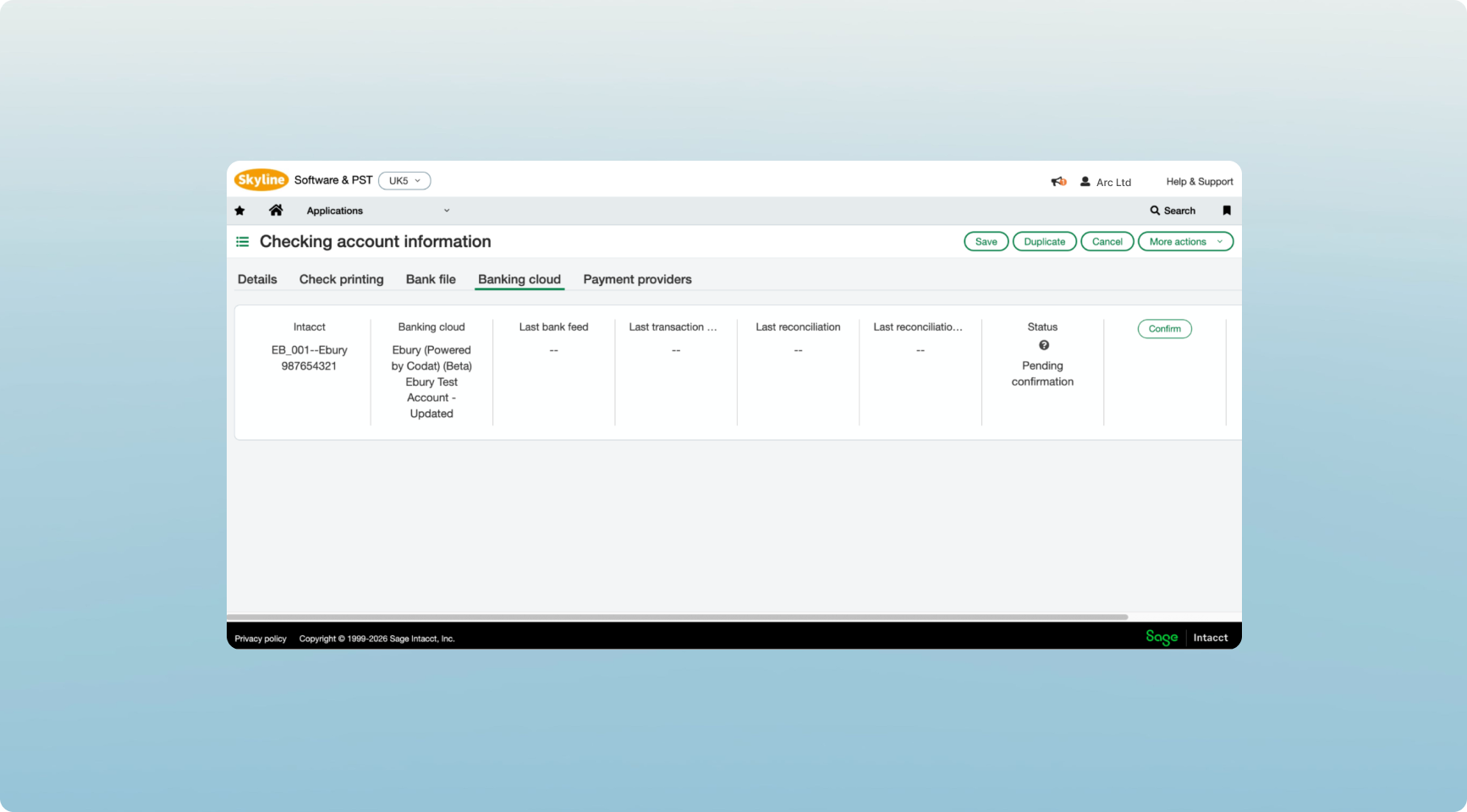
Your Ebury account and Sage are now connected and ready to sync.
Ebury Web personalisation
Personalise your Accounts view
We’ve introduced favourite currencies, giving you more control over how your Accounts dashboard is organised.
You can now select the currencies that matter most to your business directly from the All Accounts view. Your favourites will automatically appear at the top of your Accounts dashboard, making it faster to access the balances and activity you use most often.
Built around the way you work
Many of our clients operate across multiple currencies, but only a handful are used every day. This enhancement helps tailor the platform to your business, making key information easier to find and reducing the time spent navigating between accounts.
Just pick which currencies you’d like to favourite:
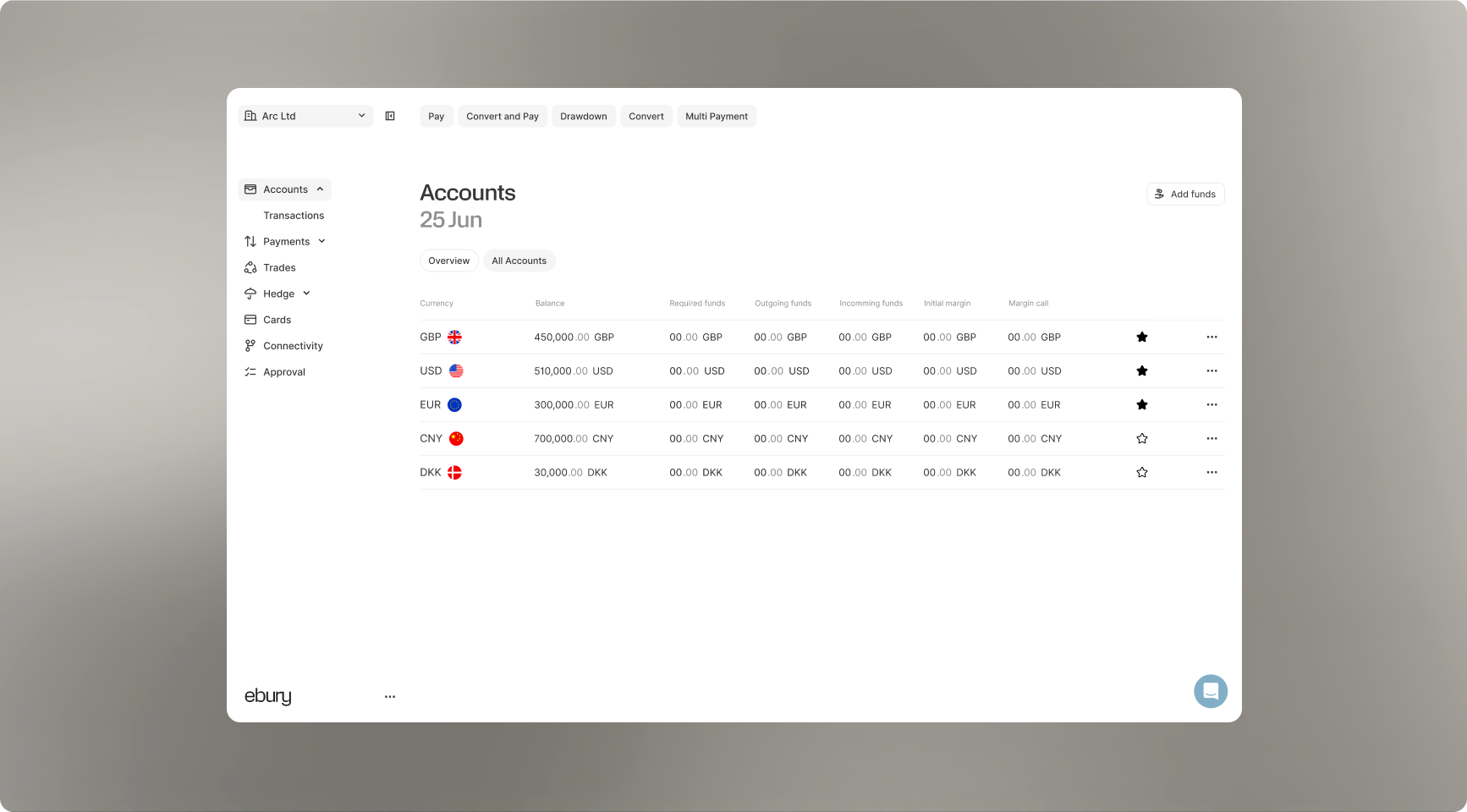
They will then be pinned to your account dashboard where you can access them easily.
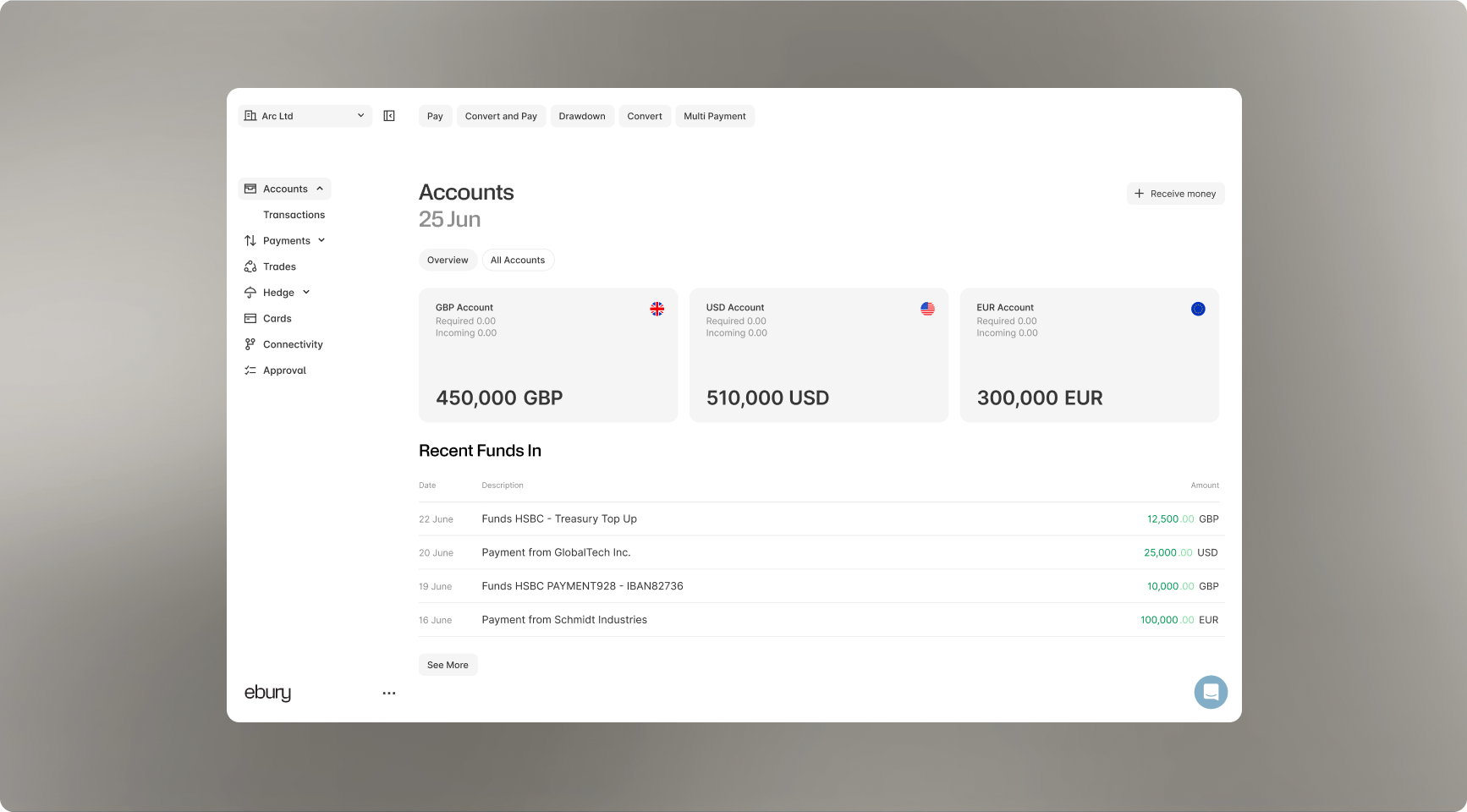
It’s a small change that makes managing global finances quicker, simpler and tailored to the way you work.
New Features
- Mark your most-used currencies as favourites
- Manage favourites directly from the All Accounts screen
- Automatically surface favourite accounts across your Accounts views
- Reduce clutter and focus on the currencies most relevant to your business
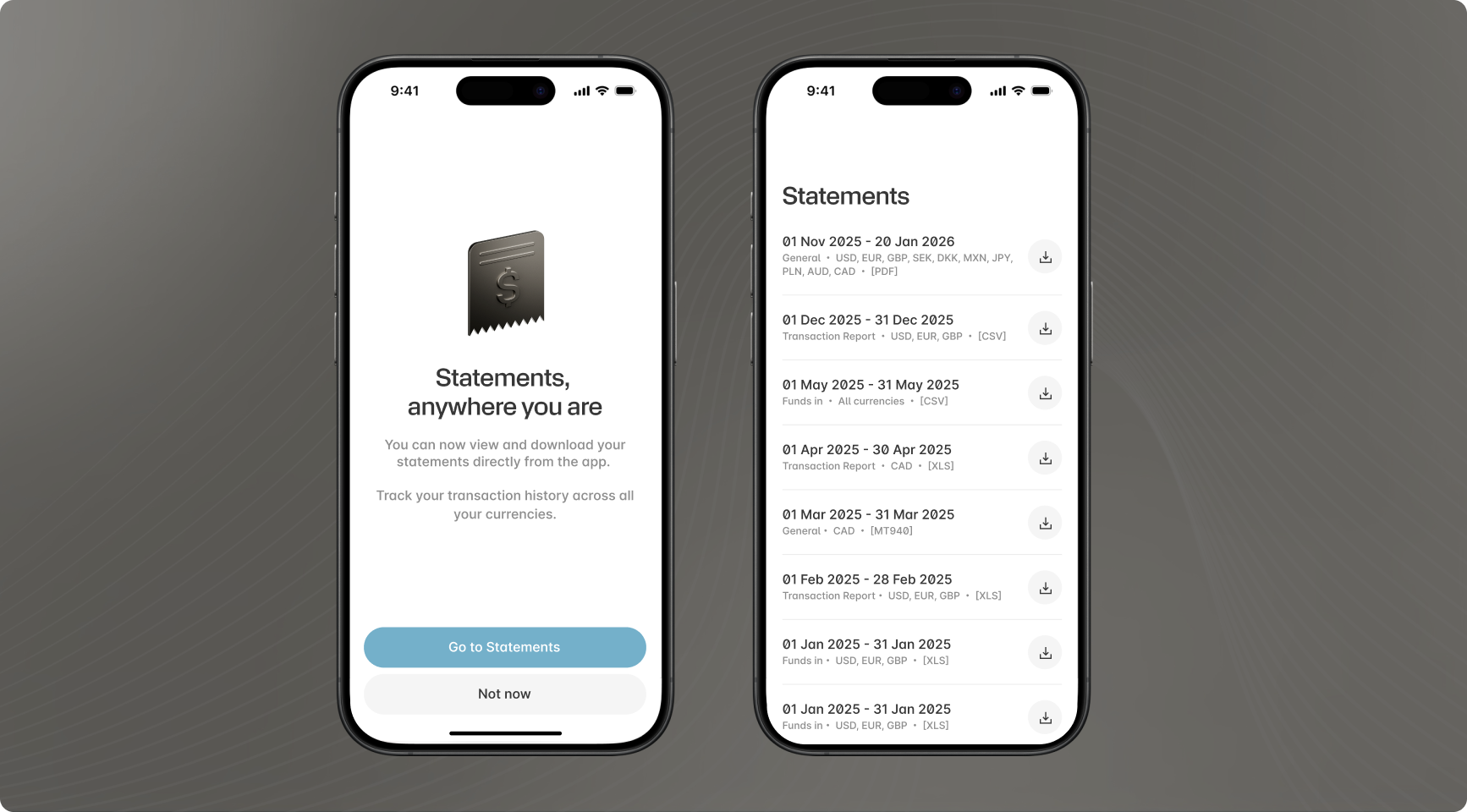
Statements-on-the-go
What’s new
View and download your Ebury account statements on mobile
Pull up your statements from anywhere
You’re now able to view and download statements for all of your Ebury accounts in a few taps.
- Every account, in one place: See balances and transactions for all your Ebury accounts, side by side.
- Statements when you need them: Select a date range and open the statement straight from your phone.
- Download a PDF on the spot: Save it, send it to your accountant, attach it to an expense - no laptop required.
- Built into the app you’re already using: Same login, same security, same accounts, complete transaction history.
Download the App
What’s new May 2026: Welcome to Ebury’s Product Updates
We’re starting with our biggest milestone yet: the brand-new Ebury platform.
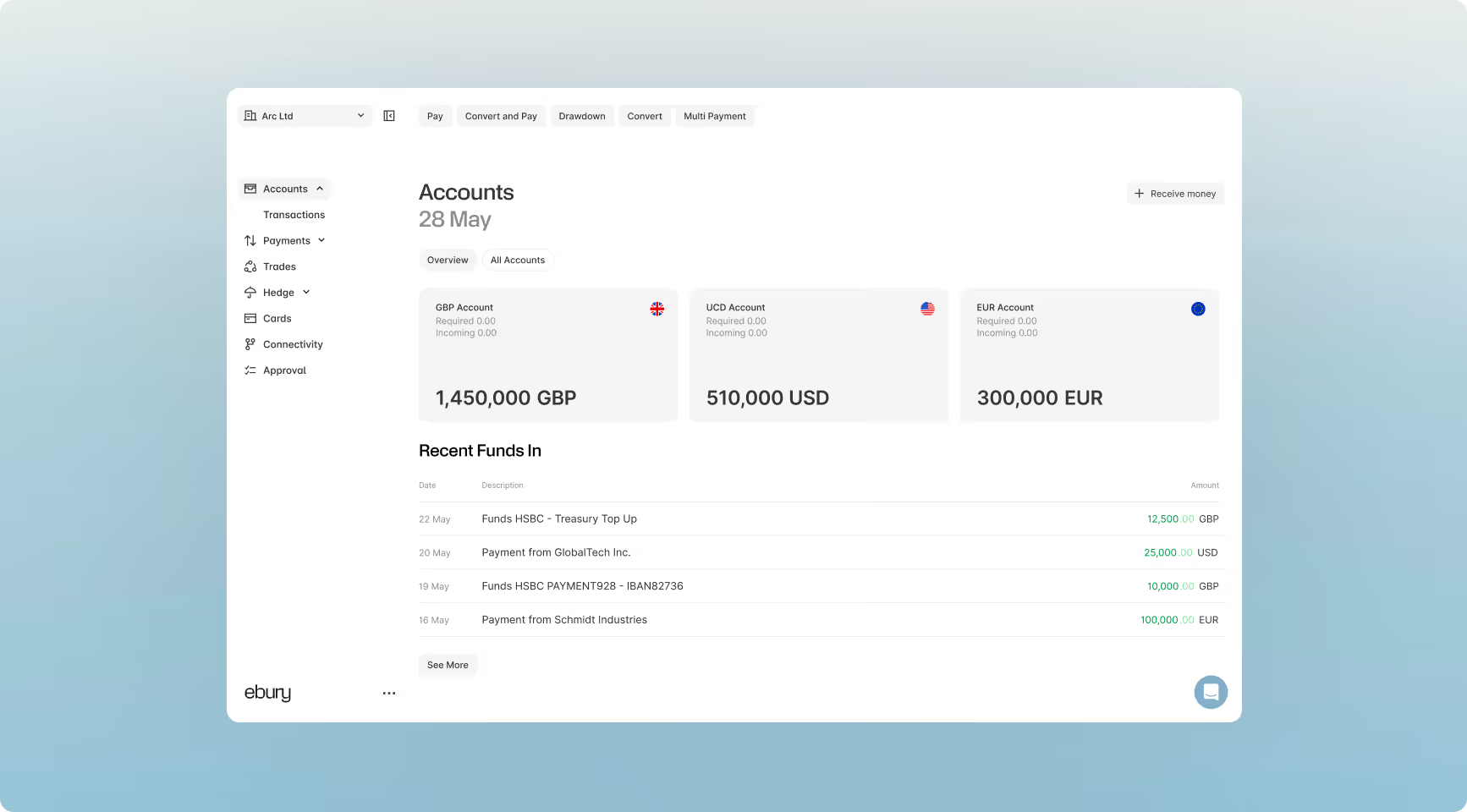
Key highlights this month
A New Platform
A fully redesigned experience with improved navigation, smoother account management, and clearer reporting.
Payment Tracker
Live, end-to-end status updates for complete visibility into your outbound international payments.
Hedge
A 360° view of your FX exposure, trades, and policy schedules, paired with enhanced analytics tools.
The New Ebury Platform: More Clarity, Control, and Speed
We’ve rebuilt the Ebury platform to be faster, more intuitive, and tailored to how modern businesses manage international finance.
Centralised Account Management
Get a clear, real-time picture of your global cash position. The upgraded Accounts page lets you view balances and track activity across all your currencies in one place.
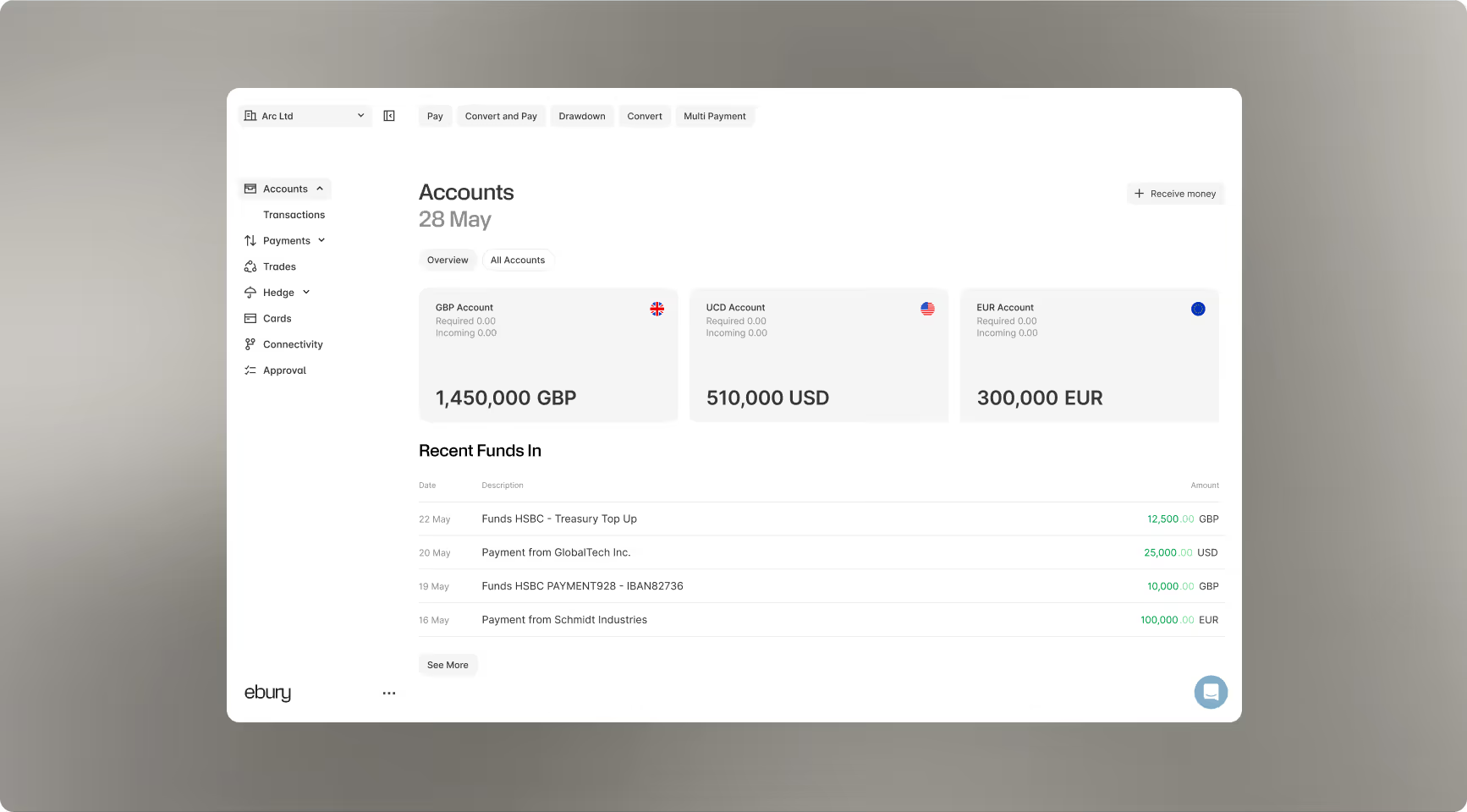
Now you can easily:
- Open new accounts: Request new currency accounts instantly.
- Add funds: Quickly add money to your existing balances.
- Personalise your view: Tailor your dashboard to highlight the currencies most important to your business.
- Review history: Track recent activity and transaction data in a few clicks.
Fast, Flexible Statements & Reporting
We’ve overhauled our reporting tools to help your finance team save time and eliminate manual processes.
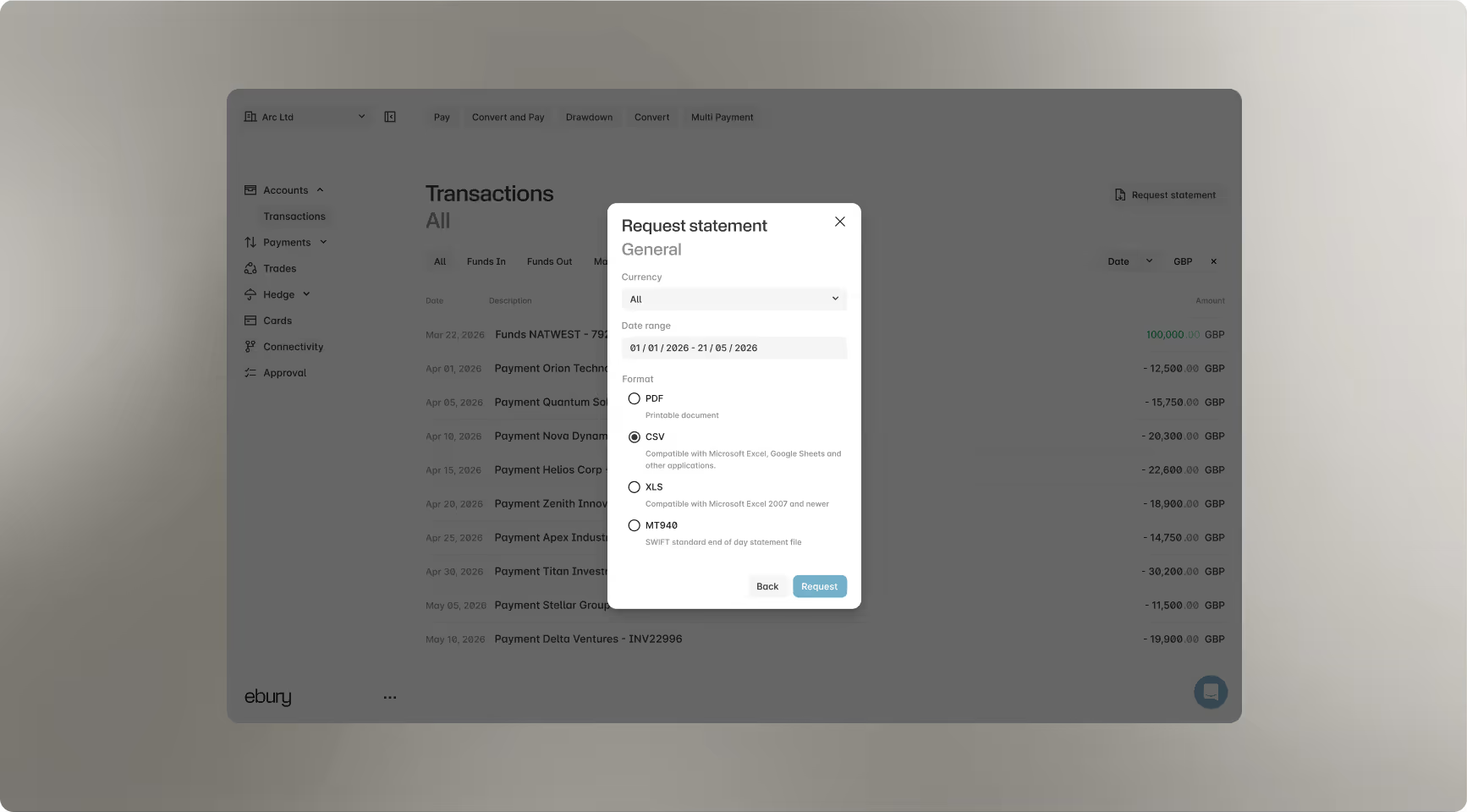
Key upgrades include:
- Customised exporting: Filter reports by specific or multiple currencies and flexible date ranges.
- Seamless reconciliation: Download statements instantly in PDF, CSV, XLS, or MT940 formats to sync directly with your ERP or accounting software
Meet the Ebury Payment Tracker
International payments often travel through multiple intermediary banks, which used to make them difficult to trace once they left our platform. To eliminate this uncertainty, we created the Payment Tracker.
Powered by SWIFT GPI data, this tool surfaces live milestone events directly inside your dashboard so you can follow your funds every step of the way.
Key Benefits
- End-to-end visibility: Track your outbound payments from the moment they leave Ebury until they safely reach the beneficiary.
- Real-time updates: Access live tracking events directly within the platform.
- No more guesswork: Know exactly where your money is at any given time.
How this works
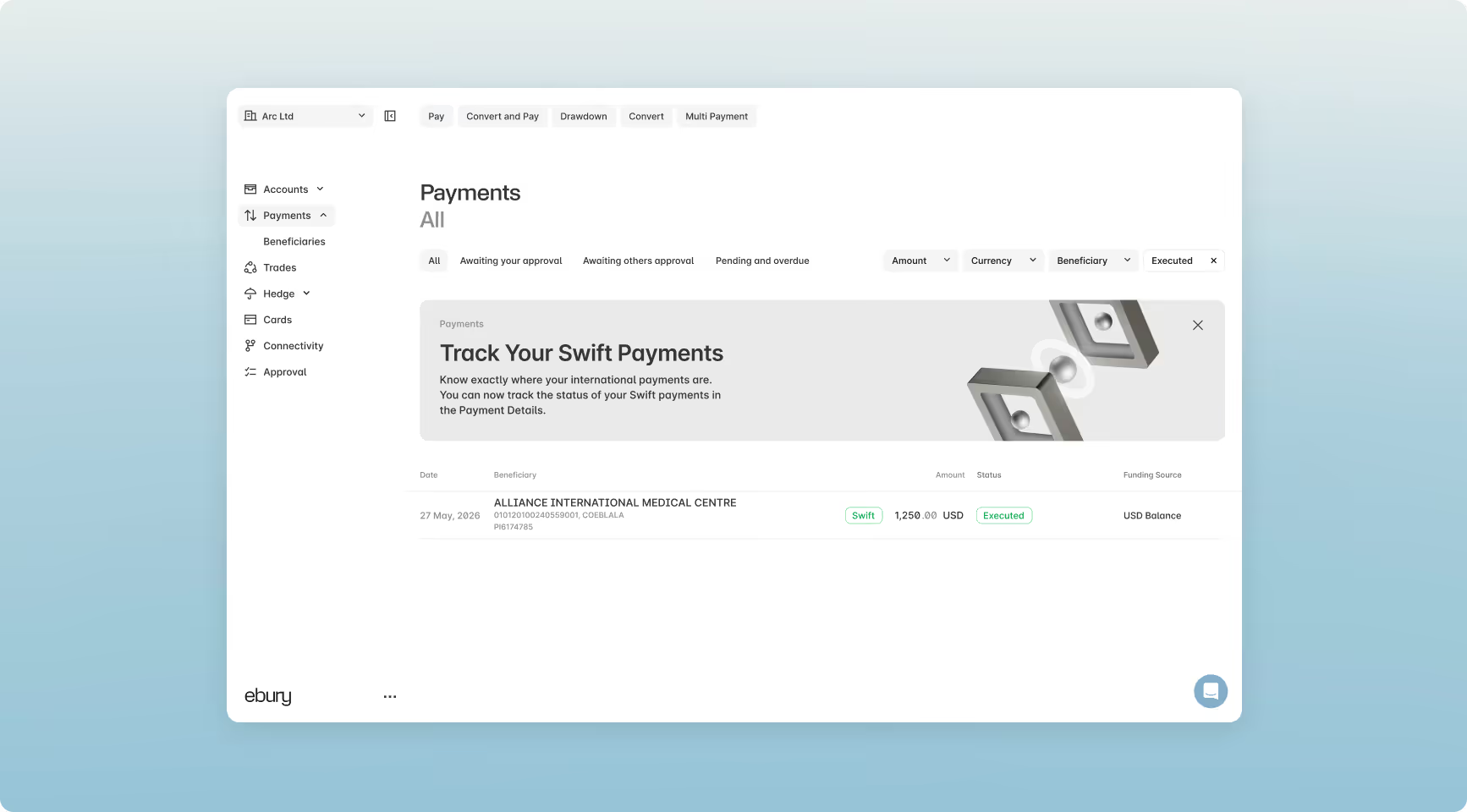
1. Open the Payments tab. You can filter for Executed payments to make transactions easier to find
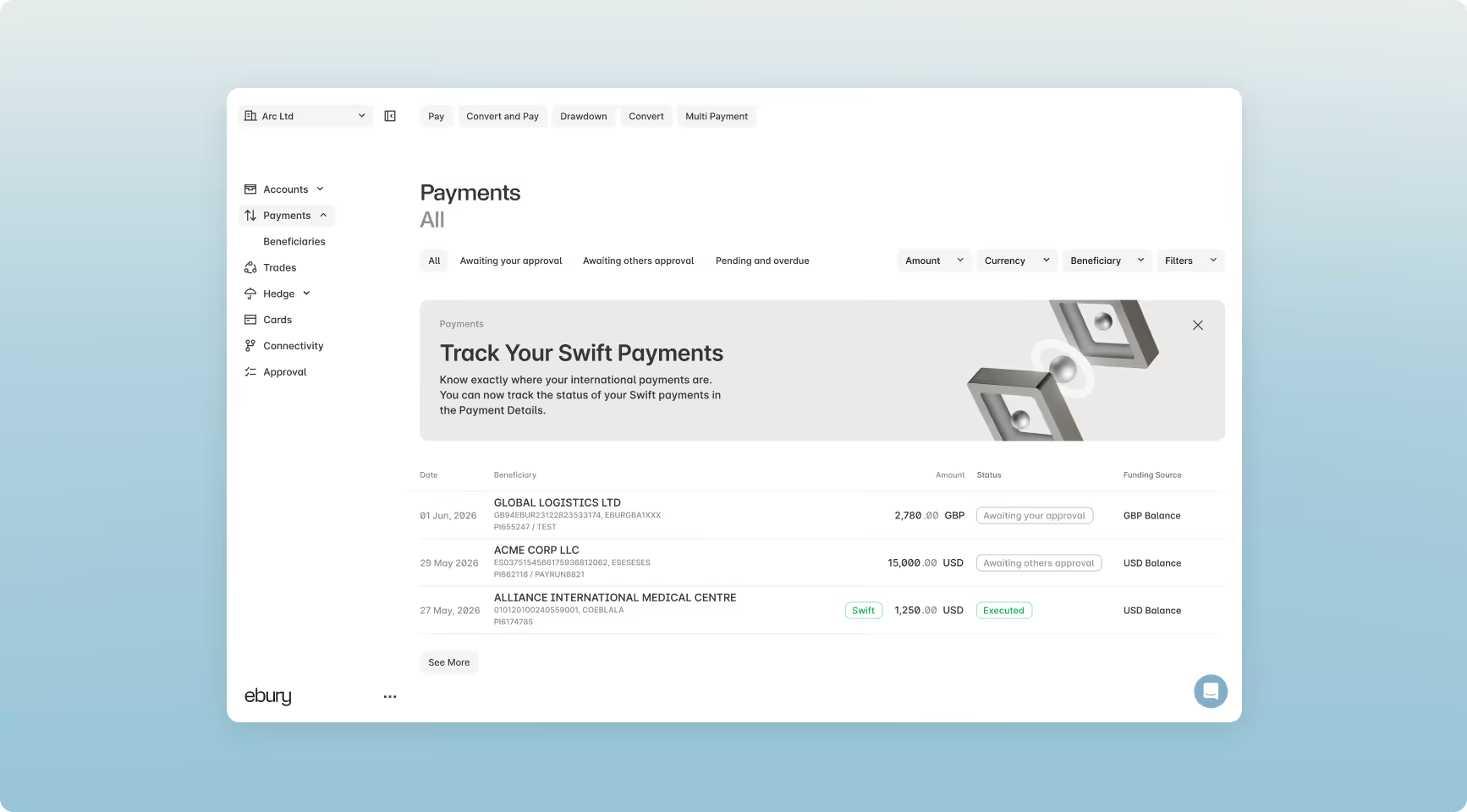
2. Trackable payments will show the green Swift button.
3. Select the payment you would like to track to see the payment information.
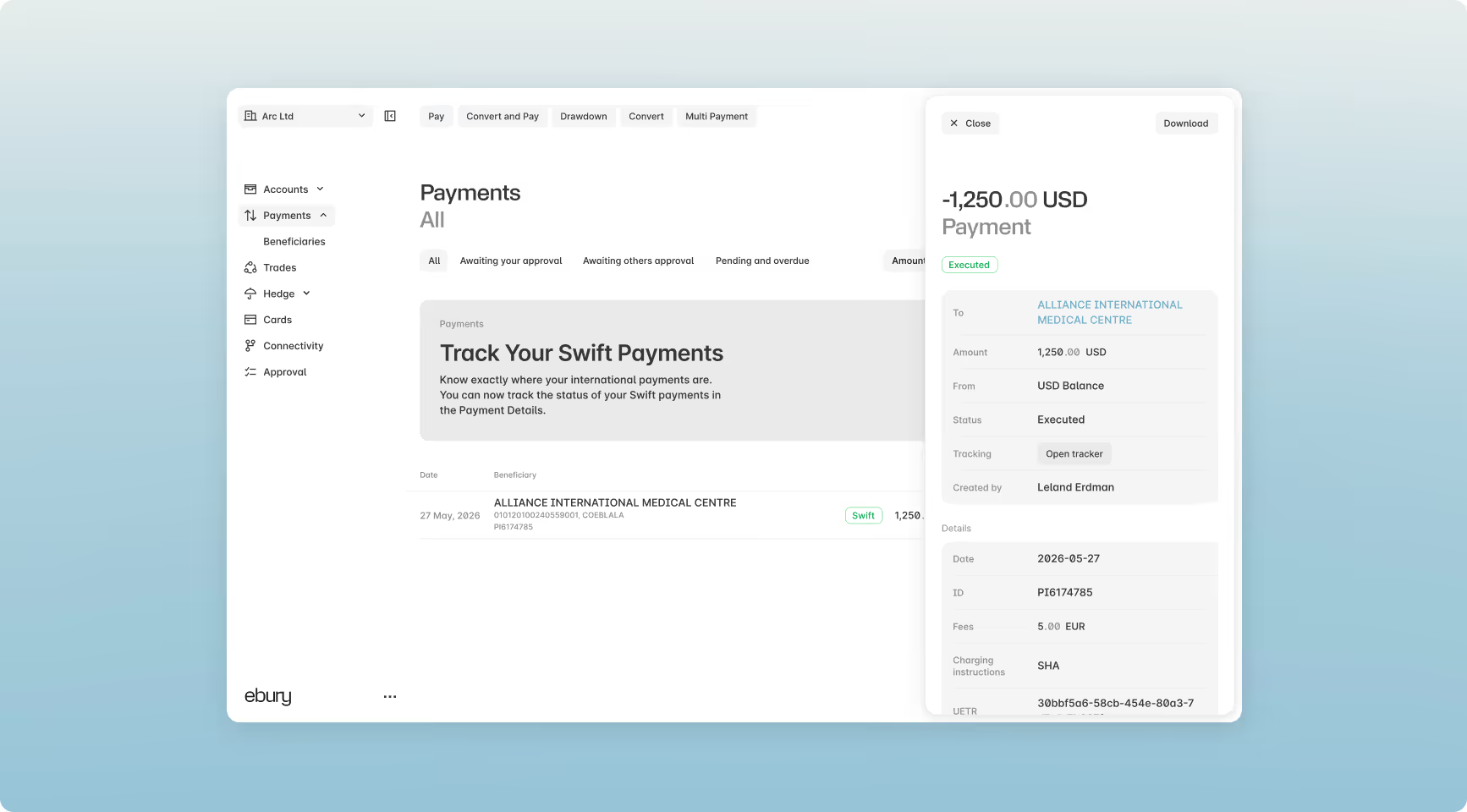
4. Select Open tracker to see the payment journey for the transaction.
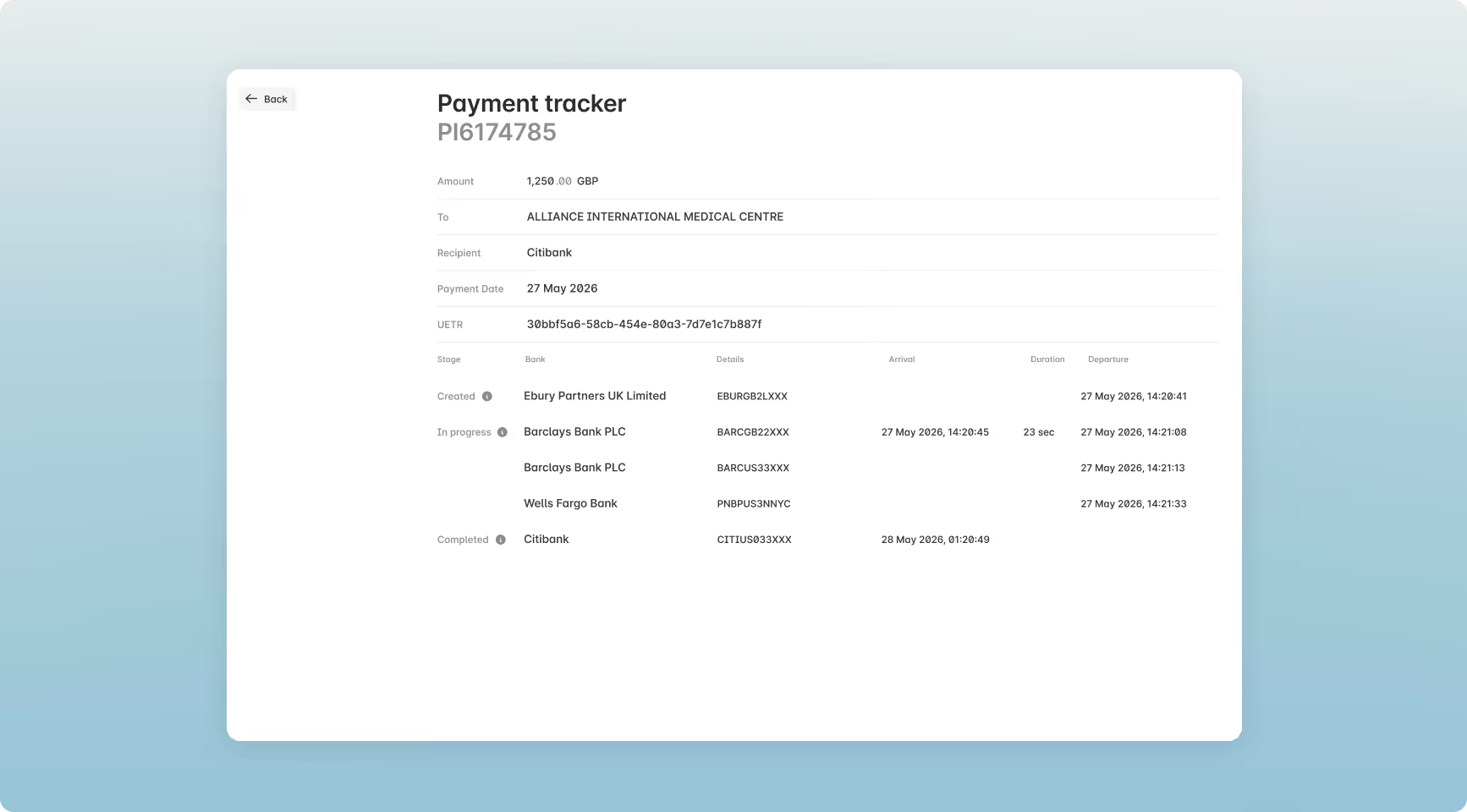
A Complete View of Your FX Hedging Activities
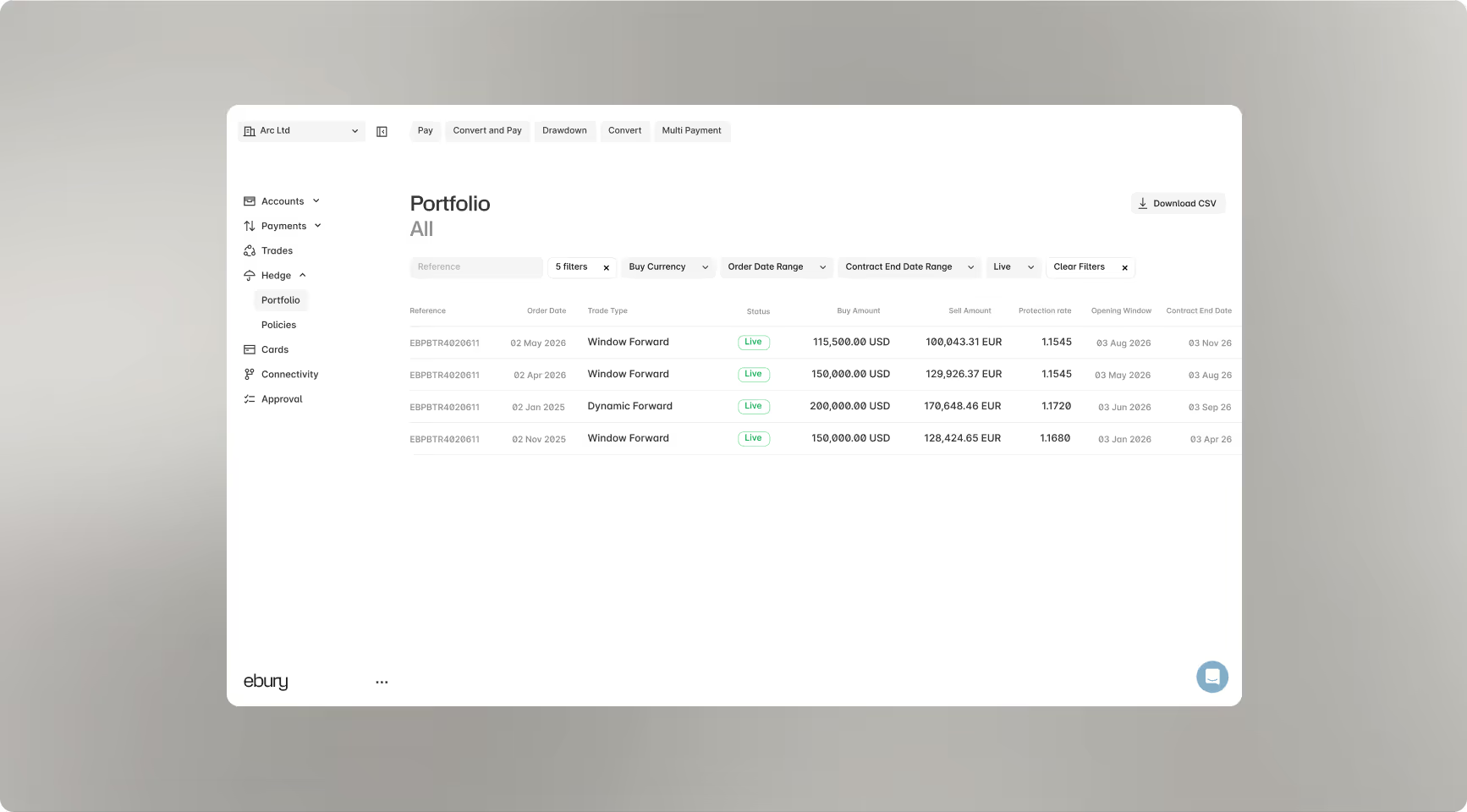
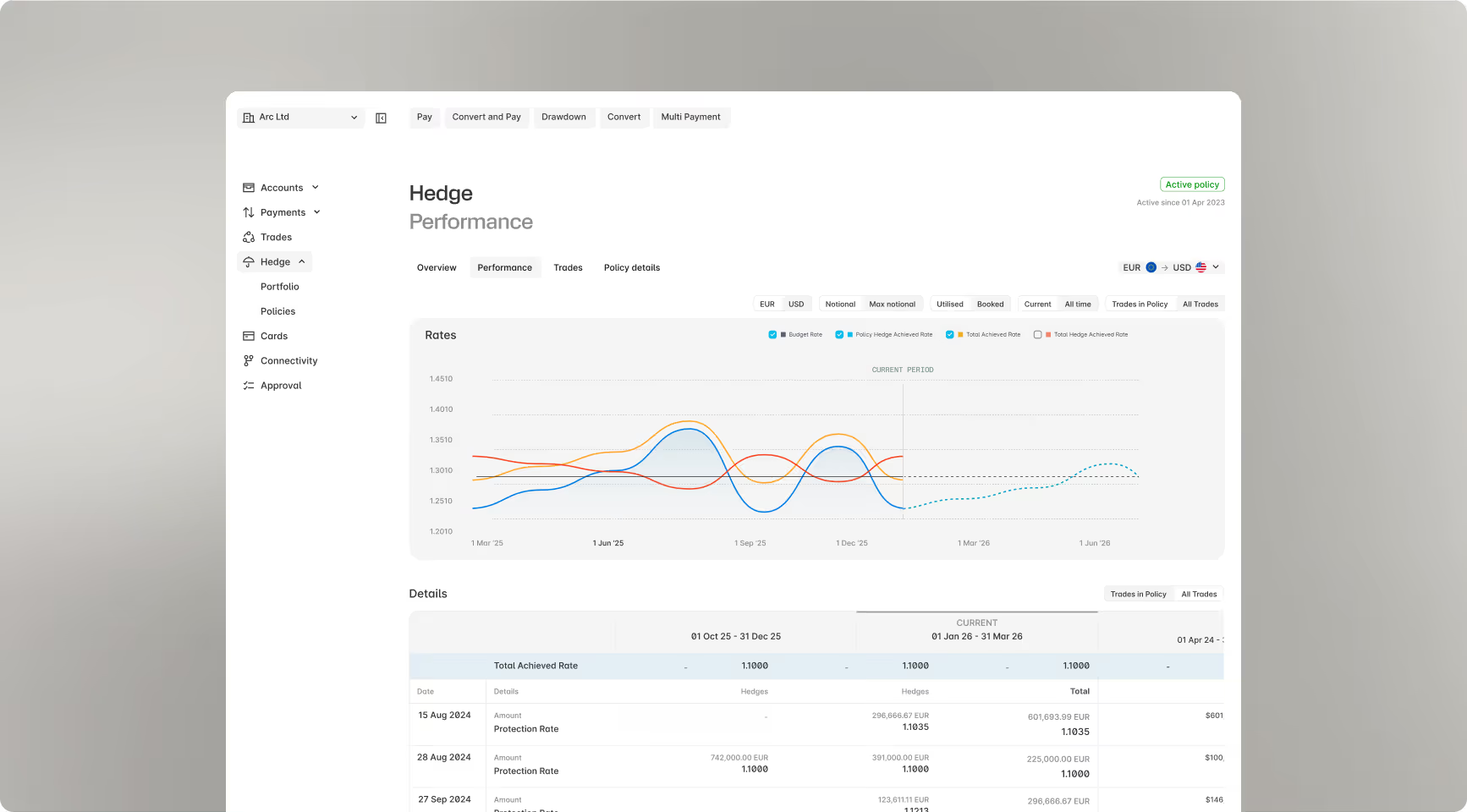
Our Hedge platform also received a major upgrade, giving you a crystal-clear view of your FX exposure, trades, and policy schedules. Now, you can compare your exposure against hedges in real time to make sharper, data-driven decisions.
What’s New in the Hedge Platform
Unified Trade Portfolio
Instantly track all live and historical Forwards and Dynamic Forwards in one centralized view, with the flexibility to pull statements on demand.
Performance Analytics
Empower your finance teams with accessible tools to view, download, and reconcile statements.
Streamlined Reporting
Empower your finance teams with accessible tools to view, download, and reconcile statements.